![Diane Poremsky [Outlook MVP]](http://www.outlook-tips.net/images/2014/MVP_BlueOnly.png)
“I exported the personal file folders from my desktop and imported them into my laptop. Now I have many duplicate messages. Obviously I did not select the correct option. How do I remove them other than one at a time?”
You could a duplicate remover, but for imports, where the last modified date is going to be very close and no new mail was downloaded during the same period, you could use advanced find to show the imported items. Use the last modified field and look for dates between. Enter the dates and times in this format: 11/24/2009 6:15 pm and 11/25/2009 6:10 am
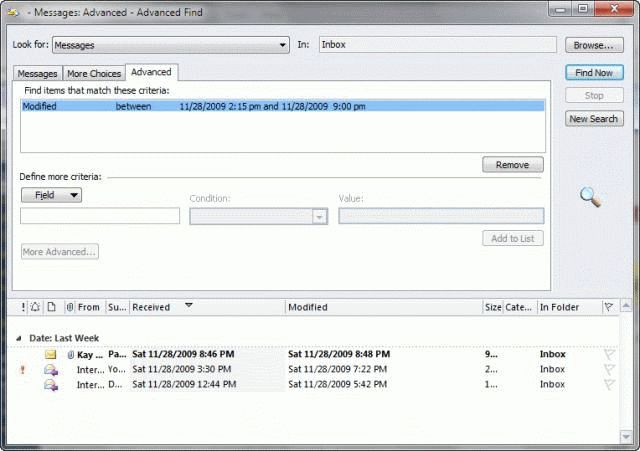
This will work with custom views and search folders too.
In situations where the duplicates have vastly different modified times and items that are not duplicated fall within the same period, a duplicate remover is a better option. See Duplicate Remover Tools for a list of duplicate remover utilities.
Published December 2, 2009. Last updated on December 8, 2011.