![Diane Poremsky [Outlook MVP]](http://www.outlook-tips.net/images/2014/MVP_BlueOnly.png)
"Can I get back a message I just sent?"
We get many questions from users who need to retrieve a message they sent. While Outlook has a Recall function, it only works with Exchange server accounts and has a very low success rate, in part because recall only works with unread messages.
Rather than using Recall, wait to send the message until you are sure you want it send it. If you have a habit of accidently sending messages before you are finished composing, create an After Sending rule to hold all messages for a few minutes so you have time to get the message from the Outbox. For more information about this method, see Tip 149: Deferred Delivery (6/24/2004)
Recall using Exchange Server Mailboxes
If you have an Exchange account and want to try recalling a message sent to a co-worker, click on the Other Actions menu in Outlook 2007/2010 or on the Actions menu in older versions.
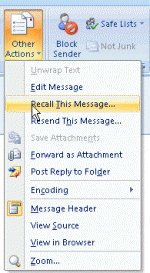
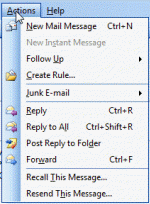
After clicking Recall this Message, the Recall dialog comes up, giving you the option of Deleting the message (if unread) or replacing the message with a new one.
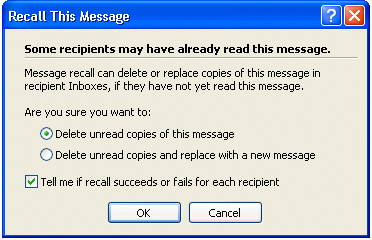
If you enable the option to be told if the recall was successful, you'll get a message back within a few minutes letting you know if the recall was successful or failed.
The Recall icon is a blue arrow over the envelope – a failed recall icon includes a red x.
More Information
Using Message Recall (Slipstick.com)
Published January 4, 2011. Last updated on May 5, 2017.