One often requested feature that is missing in older versions of Outlook is ability to insert a date and time stamp into the body of Outlook items. Beginning with Outlook 2007, Word's insert Date & Time button was added to Outlook's Insert tab; older versions will need to a custom form or an add-in to insert the date stamp.

One complaint about the Insert Date & Time command is that it is too many steps. It's not bad if you use the keyboard shortcuts: Alt+N, D, Enter will insert the date and time format you have set as default. To insert other formats, use the arrow keys to select them, then press Enter. (Home or Page Up jumps to the top entry on the list while End or Page Down jumps to the bottom.) If that is still too many steps, you can use a macro to insert the date and time.
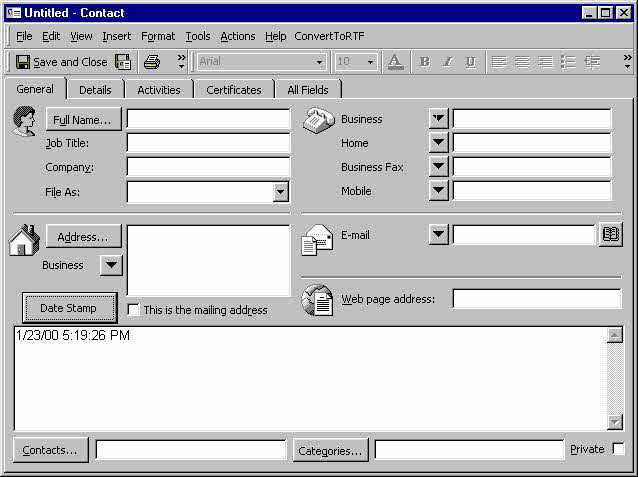
See the Tools section below for add-ins that you can use instead. Note that the custom forms method doesn't work well with Appointment forms since you can't change the first page of the form. It also doesn't work well with contacts in Outlook 2003 and 2007 since editing the first page of the form reverts the form to the older Outlook contact form (as in the screenshot below).
Macro Method
This method uses just a macro, not a command button the form. It will work with any open Outlook item, you just need to put the macro on the Quick Access Toolbar or ribbon.
The macro can either add just the date at the top of the body field or the date and time.
Instructions to use a macro and add it to the ribbon or Quick Access Toolbar well as screenshots are at How to use the VBA Editor
Sub DateStamp()
Dim objApp As Outlook.Application
    Set objApp = Application
    On Error Resume Next

   Set Item = objApp.ActiveInspector.CurrentItem

  ' Date only
  '  Item.Body = Date & vbCrLf & vbCrLf & Item.Body

  'Date and time
    Item.Body = Format(Now(), "mmm d, yyyy h:nn AM/PM") & vbCrLf & vbCrLf & Item.Body

    Set objApp = Nothing

End Sub
Custom Form Method with Button
In a new Outlook 2003 or older, open a form then:
- Select the Tools menu, Forms, Design this form
- Then from the View menu, choose View code
- In the code window, enter this code:
In Outlook 2007 and up, first show the Developer ribbon (File or Office icon, Options), then from the Developer ribbon, choose Design this form. The View Code button is in the Form section.
Sub StampDate()
   Item.Body = Now() & vbCrLf & vbCrLf & Item.Body
End Sub

Sub CommandButton1_Click()
  Call StampDate()
End Sub
After entering the code, close the code window.
Next:
- Open the Control toolbox and drag a command button to the form.
- Rename it by right clicking on it and selecting Properties.
- In the Caption field, type in the desired name.
To use, click the button you created.
Custom Form - Automatic Method
If you want the date stamped in the Notes field every time you open an item, you can create a custom form as described above, but use the code below instead. You also won't need to add a button to the form, so it will work with contacts. Although today's date is added to the Notes field every time you open a contact, it's not saved until you Save the contact.
In Outlook 2007 and up, first show the Developer ribbon (File or Office icon, Options), then from the Developer ribbon, choose Design this form. The View Code button is in the Form section.
In Outlook 2003 and older, or Outlook 2007's main window, go to Tools menu, Forms, Design this form. Then from the View menu, choose View code.
In the code window, enter this code:
Function Item_Open()
Item.Body = Now() & vbCrLf & vbCrLf & Item.Body
End function
Publish the form and set it as the default form for the folder, if desired. If you want to use it with existing items you'll need to convert the items to use the new form. Instructions are at How to Set a Custom Form as the Default for a Folder.
How to use Macros
First: You need to have macro security set to the lowest setting, Enable all macros during testing. The macros will not work with the top two options that disable all macros or unsigned macros. You could choose the option Notification for all macros, then accept it each time you restart Outlook, however, because it's somewhat hard to sneak macros into Outlook (unlike in Word and Excel), allowing all macros is safe, especially during the testing phase. You can sign the macro when it is finished and change the macro security to notify.
To check your macro security in Outlook 2010 and newer, go to File, Options, Trust Center and open Trust Center Settings, and change the Macro Settings. In Outlook 2007 and older, look at Tools, Macro Security.
After you test the macro and see that it works, you can either leave macro security set to low or sign the macro.
Open the VBA Editor by pressing Alt+F11 on your keyboard.
To put the code in a module:
- Right click on Project1 and choose Insert > Module
- Copy and paste the macro into the new module.
More information as well as screenshots are at How to use the VBA Editor

1- Go to: File - Options - Trust Center - Trust Center Settings - Macro Settings, then Enable all macros
2- From the developer tab (you need to add it from the options- customize ribbon) open the visual basic and navigate to ThisOutlookSession from the tree on the left 'project1'
3- write the below and save:
Private Sub Application_ItemSend(ByVal item As Object, cancel As Boolean)
If InStr(item.Body, "########") Then
item.HTMLBody = Replace(item.HTMLBody, "########", Format(Now, "dd/mm/yyyy"))
End If
End Sub
4- In your saved signature put ####### so it will replaced by the current date.
Hi I need this but for the date to be 7 days in the future. I know in excel it would be Now()+7 but can't seem to get it to work maybe syntax is wrong? Any help on what the code would be is appreciated
Date + 7 or Now ()+ 7 work. What happens when you use it?
Date +7 returns 7/29/2021
Now() + 7 returns 7/29/2021 12:26:11 AM
sorry that was
I ended up using the below. It works but the format still puts the year on and I can deal with that, so not sure what i missed with that but it seems to do the job.
Private Sub Application_ItemSend(ByVal item As Object, cancel As Boolean)
If InStr(item.Body, "1weekdate") Then
item.HTMLBody = Replace(item.HTMLBody, "1weekdate", DateAdd("d", 7, Format(Now, "dd/mm")))
End If
End Sub
Try this : Format(DateAdd("d", 7, Now), "dd/mm")
other option is something like this
strDate = DateAdd("d", 7, Format(Now, "dd/mm")
item.HTMLBody = Replace(item.HTMLBody, "1weekdate", Format(strDate , "dd/mm"))
How can I add/appropriately name my custom fields to the exported CSV files. I dont see the new fields but do see "user fields"
Import/Export command doesn't export custom fields - you would need to either use a macro or create a list view with the fields you need in the view, then copy and paste. (Doesn't work well with body field or other multi-line fields though.)
I have used the custom form methods for years without any problems until recently. Now the button has stopped working and every time I open a contact, the previous note's date. Any thoughts?
I'm guessing it is this security change: https://www.slipstick.com/outlook/custom-form-security/
there is a reg key you can set to enable scripts (it's in that article).
GOD Bless YOU!!!
This has been haunting me all week and your fix worked, Thank You!
Dear Diane, I am trying to use Your method with a customized Task Form.
When You use DateStamp for the second time You lose all the formatting of the previous text.
I tried using Item.HTMLBody option, but it doesn't work.
What can be applied?
Thank You!
Try using rtfbody (it errored for me in outlook 2016) - if it fails in your version too, then you'd need to use word code, which will not work in script within the form. This is only practical if you need it on one computer as you need the vba on all computers - the code samples at https://www.slipstick.com/developer/code-samples/create-task-selected-text/ us this technique to save messages to tasks - you'd use similar code.
I recently was promoted and now I have switch platforms(not by choice). In Windows this was a fairly simple function that I used quite frequently. In OFM 2011, not so much. All I want to do is simply add a date and time stamp to an Outlook/Calendar item. Can anyone point me in the right direction? Is there an applescript that allows one to perform this function? Any feedback will be greatly appreciated.
Thank You!
I may be totally misappropriate in my comments on this forum but here goes anyway. I am totally puzzled by how ANY third party software app can synchronize the contacts in Outlook with any other database (such as my phone, be it my BB10, my BB Priv Android, my iPhone or between my desktop and my laptop) if the Outlook database doesn't have date/time stamps on every contact record showing when it was originally created and when it was last modified. It appears that these two fields exist in Outlook, but do not appear to be managed properly by Outlook (and can't be relied upon) and there appears to be no way to export these fields to a CSV file. I'm beginning to understand why no matter which third party synchronizing app I use, I can always expect an unreliable result (like duplicates or missing or inappropriately merged contact records). I used to get on quite well when I was using Outlook 2003 and a BB O/S 10 phone with BB's proprietary BB LINK utility, but since then I have had to try many different synchronizing apps for my different phones and operating systems and my contacts database has become… Read more »
Just because you can't include those fields in an export doesn't mean the programs can't see the date. Some sync utilities set an internal property on the it to help manage the sync. If you are trying to keep in sync using "sneaker net", a macro that checks the dates would be better than using export. (Or just copy the pst back and forth).
The easiest way to keep outlook in sync is using an exchange account (outlook.com is now on exchange server). The second easiest is using icloud or iTunes - which of course, requires apple devices. Companion link works good too.
Hi Diane,
I created additional fields in Outlook using the Developer tool but this new format applies only to the new contacts created. Is there a way to apply this new format to existing contacts? Thank you in advance.
Hi Diane,
I applied the custom above for auto date/time stamp to my office 365 desktop and it works in notes only when I add a new contact and only for the first time...then does not work any longer. Is there a way for automatic date/time stamp everytime I add notes to a contacts record?