![Diane Poremsky [Outlook MVP]](http://www.outlook-tips.net/images/2014/MVP_BlueOnly.png)
So you found some code on the Internet that you think might do what you need done. But how do you use it?
First you need to open the VBA Editor by pressing Alt+F11.
Expand Microsoft Outlook Objects
Double click on ThisOutlookSession to open it in the editing pane on the right side.
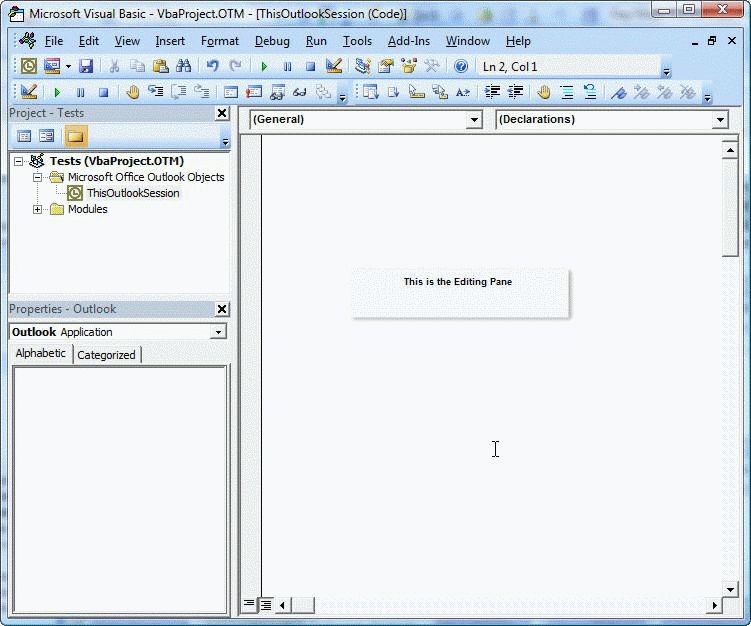
Paste (or type) the code sample into ThisOutlookSession.
Press F5 or the Run button to run the macro. (It's highly recommended you make a backup of the folders or message store before running macros.)
You'll also need to change macros security or use selfcert.exe to sign your macros. Access the dialog to change the security level from Tools, Macros, Security. Set it on "always ask". Do not choose the Low option (run all, never ask). Some security software will set it to High and your macros will not run.
Need help with sample code? Try the forums at Outlookcode.com or the Microsoft programming forms, accessible though OutlookForums
Both Outlookcode and VBOffice.net have a large number of code samples.
Published May 14, 2011. Last updated on June 7, 2021.