![Diane Poremsky [Outlook MVP]](http://www.outlook-tips.net/images/2014/MVP_BlueOnly.png)
Last week we had a record number of people asking about saving copies of forwarded messages:
I cannot find where the messages are that I forward. I looked in the Sent folder but don't see them there.
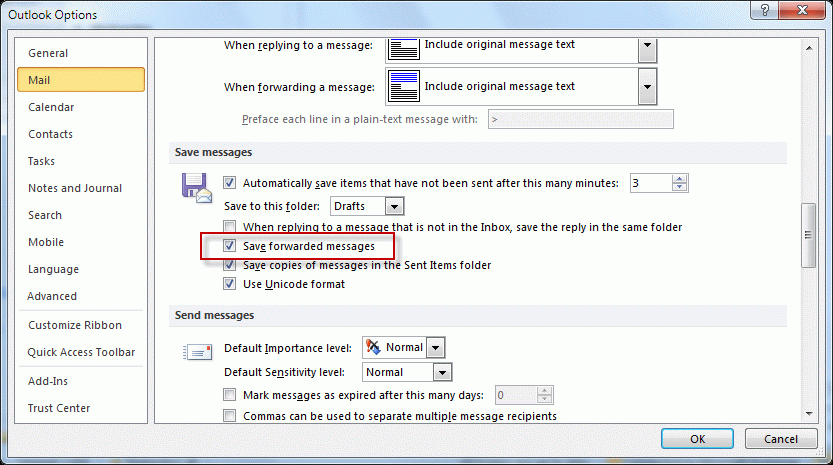
Check your settings in Tools, Options, Email Options, Advanced email options – is Save forwarded messages enabled? (In Outlook 2010, this setting is at File, Options, Mail – look in the Save Messages section about halfway down for the option to Save forwarded messages.)
When this option is enabled, your copy of messages you forward are saved. When this is not selected and you forward a message, your copy is deleted.
While this may not be desired when you forward messages to friends and family, in a business environment where messages are forwarded to the correct person, disabling this option makes a lot of sense as it removes "useless" messages from your mailbox.
The default setting is Enabled (forwarded messages are saved).
Published July 5, 2011. Last updated on October 25, 2013.