![Diane Poremsky [Outlook MVP]](http://www.outlook-tips.net/images/2014/MVP_BlueOnly.png)
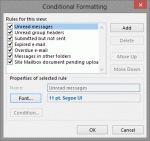
A visitor to OutlookForums wanted to know how to change the colors in Outlook 2013's message list.How do you change the obnoxious color of the email headers on Outlook 2013? The email headers are all this distracting and obnoxious cobalt blue.The message list in Outlook 2010 and older doesn't have "obnoxious colors", but you can change the colors or create new … [Read more...] about Tip 1059: Change the color of messages in the Inbox
automatic formatting
Tip 993: How 'doesn't contain' filters work with multiple conditions
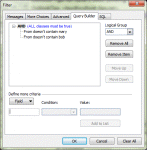
A lot of users end up frustrated and confused when they try to use multiple "doesn't contain" rules in a filter (even I sometimes have trouble with the logic.) When you use "doesn't contain" with two different values, such as "From doesn't contain Mary or Bob", you are asking the filter to do something if either of the conditions are true: If From doesn't contain Mary … [Read more...] about Tip 993: How 'doesn't contain' filters work with multiple conditions
Tip 982: Filtering for 'where I am the only person on the To line'
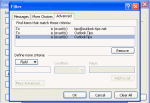
The filter rule for "where I am the only person on the TO line" only applies to the display name for the email account, not the email address. I want to create a conditional formatting view for my Inbox to highlight all messages sent only to me. I selected the box "where I am the only person on the To line" but it only applies the conditional formatting if the name is … [Read more...] about Tip 982: Filtering for 'where I am the only person on the To line'
Tip 958: Display Task Status in the To-Do Bar
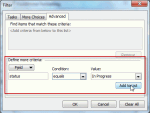
Tasks in the To-Do Bar are the subject of a lot of questions about how to control what tasks are visible. Is it possible to display the Status of a Task as an icon in the To-Do bar? I would like to mark tasks that are currently "Deferred" or "Waiting on someone else", so that one can immediately recognize their Status. Sure. Create a custom view and apply automatic formatting … [Read more...] about Tip 958: Display Task Status in the To-Do Bar
Disable Automatic Formatting for Bullets

From an Outlook user: My problem is that whenever I type two hyphens, Outlook automatically thinks that I want it start a bulleted list and it will change my two hyphens into a bullet. That would be fine and dandy, but the automatic bullets in Outlook are not recognized by our accounting software and do not transfer over when I copy/paste. To get around this, I have been … [Read more...] about Disable Automatic Formatting for Bullets