![Diane Poremsky [Outlook MVP]](http://www.outlook-tips.net/images/2014/MVP_BlueOnly.png)
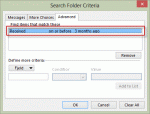
An Outlook user wanted to know how to create a custom search folder.I need a search folder which displays large e-mails received more than 3 months ago. I know how to find bulk e-mails, but what about old e-mails? I tried to filter using the "received" field, but there are no standard conditions that meet my purpose. I don't need "last week" or "last month" and while "on … [Read more...] about Tip 1053: Create a Search folder to find older messages
filters
Tip 993: How 'doesn't contain' filters work with multiple conditions
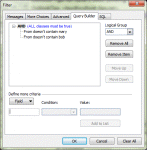
A lot of users end up frustrated and confused when they try to use multiple "doesn't contain" rules in a filter (even I sometimes have trouble with the logic.) When you use "doesn't contain" with two different values, such as "From doesn't contain Mary or Bob", you are asking the filter to do something if either of the conditions are true: If From doesn't contain Mary … [Read more...] about Tip 993: How 'doesn't contain' filters work with multiple conditions
Tip 982: Filtering for 'where I am the only person on the To line'
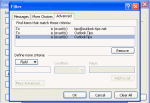
The filter rule for "where I am the only person on the TO line" only applies to the display name for the email account, not the email address. I want to create a conditional formatting view for my Inbox to highlight all messages sent only to me. I selected the box "where I am the only person on the To line" but it only applies the conditional formatting if the name is … [Read more...] about Tip 982: Filtering for 'where I am the only person on the To line'
Tip 947: How to find 'lost' Contact Groups
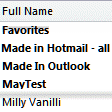
I set up a contact group. After saving it I can't find it anywhere. I tried searching but it's not found. Maybe I misspelled the name? There are (at least) three ways to find contact groups (distribution lists) within a contacts folder - Instant search, use a List view and look over the list, or create a filtered view. If you have a lot of contacts or a lot of groups, … [Read more...] about Tip 947: How to find 'lost' Contact Groups
Tip 900: Sort Tasks with "None" at the End
This tip was submitted by Hedgehog: I have a tip for you that I have not seen posted on the web, and that has been driving me, and obviously others crazy. It has to do with ordering task views so that a due date of "None" appears at the end of the list, yet the other due dates appear in ascending order. One simple (but not completely foolproof) way to do this is to … [Read more...] about Tip 900: Sort Tasks with "None" at the End