![Diane Poremsky [Outlook MVP]](http://www.outlook-tips.net/images/2014/MVP_BlueOnly.png)
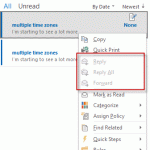
In Outlook 2010, I was able to save a few "template" messages in the draft folder and when I needed to send a message, I could click Forward and kept the original to use later. With Outlook 2013, Forward is disabled. How can I save a copy of my messages?In older versions of Outlook, you could easily use Draft messages as templates, simply select a draft message and … [Read more...] about Tip 1076: How to reuse Draft messages
forward
Tip 886: Saving Forwarded Messages in Outlook
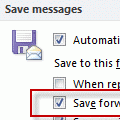
Last week we had a record number of people asking about saving copies of forwarded messages:I cannot find where the messages are that I forward. I looked in the Sent folder but don't see them there.Check your settings in Tools, Options, Email Options, Advanced email options - is Save forwarded messages enabled? (In Outlook 2010, this setting is at File, Options, Mail - … [Read more...] about Tip 886: Saving Forwarded Messages in Outlook
Tip 433: See Replied to Time
Would you like to be able to see the time you replied to or forwarded a message in your message list view? You can, using an Extension form configuration file (*.CFG) that exposes the hidden Extended MAPI property PR_LAST_VERB_EXECUTED, which holds the replied to/forwarded times. The best part is, you don't need to have a clue about what I just said. :) Michal Bednarz of … [Read more...] about Tip 433: See Replied to Time
Tip 114: Redirect Messages

A common request is a way to redirect messages, so that when a message is forwarded, the recipient can reply directly to the original sender. Outlook doesn't support a true redirect and while add-ins exist that do redirects, it takes just a step or two for anyone to "redirect" a message. Method 1 (non-Exchange accounts): Open the message and choose Actions, Resend. You may … [Read more...] about Tip 114: Redirect Messages