![Diane Poremsky [Outlook MVP]](http://www.outlook-tips.net/images/2014/MVP_BlueOnly.png)

Official Response and explanation from Microsoft: Outlook 2013 Folder Pane Disappears After Installing September 2013 Public Update If you lost your navigation pane after installing the September patches, you'll get it back after you install the August 13 2013 hotfix. Read about the hotfix at Description of the Outlook 2013 hotfix package (Outlook-x-none.msp): August … [Read more...] about Missing your Outlook 2013 navigation pane?
hotfix
Tip 885: Outlook 2010 SP1 released
Office 2010 SP1 released Office 2010 SP1 was released earlier today and is available on Microsoft Update. Office 2010 SP1 contains cumulative and public updates to date for the various applications that are part of the Office suite and many previously released hotfixes for Outlook are included in SP1. To download and install, log into Microsoft Update and check for new … [Read more...] about Tip 885: Outlook 2010 SP1 released
Tip 876: Fixed in SP1: Outlook 2010 & default IMAP accounts
Update: This hotfix is included in Outlook 2010 SP1. See Default account fix for more information and the required registry setting. The issue: When clicking on a "mailto:" on a web page or using the Send to command in other applications, Outlook opens a new email. In Outlook 2010, when the default account is an IMAP account, it uses the account assigned to the default … [Read more...] about Tip 876: Fixed in SP1: Outlook 2010 & default IMAP accounts
Tip 873: Archiving by received date in Outlook 2007 and 2010
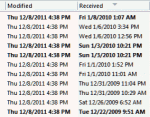
Auto-archiving creates confusion in many users because Outlook archives items based on the last modified date, which may or may not be the same as the received date (or start, completed dates). It's usually not a problem unless you import messages or edit older messages, which changes the last modified date. Import & Export, copying, and editing items are among the things … [Read more...] about Tip 873: Archiving by received date in Outlook 2007 and 2010
Tip 862: Hotfix for Outlook 2007 Printing Problems
If you were affected by printing problems after installing KB2509470, a new hotfix is available that corrects the printing problems. This hotfix also fixes a few other issues – see the KB article for complete details. Fixed: issue with proposed meeting time not visible in the list of available meeting proposals. Additionally, when you accept the meeting proposal, the meeting … [Read more...] about Tip 862: Hotfix for Outlook 2007 Printing Problems