![Diane Poremsky [Outlook MVP]](http://www.outlook-tips.net/images/2014/MVP_BlueOnly.png)
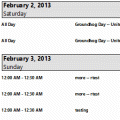
This problem was fixed in one of the July 2013 updates. Verify Office is updated from File, Office Account, Update Options. You should have version 15.0.4535.1511 or higher.Users are discovering that in Outlook 2013, appointments are duplicated when you use the Calendar details style.If you prefer to use the Calendar Printing Assistant for Outlook, it should … [Read more...] about Tip 1064: Calendar details printout duplicates appointments
print calendar
Tip 960: (Another) Calendar Printing Bug
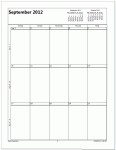
Starting the week on Monday is the cause of this new printing bug. An Outlook 2010 user wanted to print a calendar using the options to print exactly one month per page and to print only the weekdays (Monday - Friday) but with September 2012, the printout included only the first 3 weeks – the last week is missing. The fix: Set the calendar to start on Sunday and the … [Read more...] about Tip 960: (Another) Calendar Printing Bug
Tip 952: Missing Date Picker in Outlook's Print Options Dialog
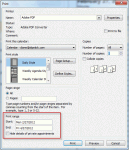
The Print Options dialog in Outlook 2010 does not have date pickers available when selecting a range. I recently was upgraded to Outlook 2010. When I wanted to print a calendar in Outlook, I clicked in the date box and a small calendar would pop up to select the dates from. This has disappeared in Outlook 2010, and now you must remember what dates you want to start and end … [Read more...] about Tip 952: Missing Date Picker in Outlook's Print Options Dialog
Tip 768: OL2007: Line Wrap in Calendar Printout
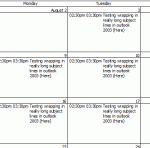
NoteThis bug was (finally) fixed by the January 2011 update. If Outlook is fully updated, lines should wrap properly in a printed monthly calendar. In older versions of Outlook, users could print a monthly calendar and long subjects wrapped to multiple lines. This was broken in Outlook 2007 – if you wanted the subject to wrap, you needed to use the Calendar Printing … [Read more...] about Tip 768: OL2007: Line Wrap in Calendar Printout
Tip 463: Another Calendar Printing Bug
Outlook 2007 has a lot of calendar printing bugs, which I suppose, is why they released a Calendar Printing Assistant. Some were fixed in SP1. Others are just coming to my attention, probably because I don't print calendars. The newest bug involves printing a series of full month calendars. If you start the series in a month that spans 6 calendar weeks, each monthly calendar … [Read more...] about Tip 463: Another Calendar Printing Bug