![Diane Poremsky [Outlook MVP]](http://www.outlook-tips.net/images/2014/MVP_BlueOnly.png)
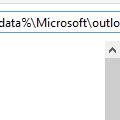
Are you having problems printing from Outlook? Try deleting the OutlPrnt file - it's kept in C:\Users\%username%\AppData\Roaming\Microsoft\Outlook in Windows 7 and newer. This file holds information about print configurations and customizations.You can jump to the folder where OutlPrnt is, open Windows Explorer then type or paste %appdata%\Microsoft\outlook into the … [Read more...] about Can't Print in Outlook?
printing
Tip 862: Hotfix for Outlook 2007 Printing Problems
If you were affected by printing problems after installing KB2509470, a new hotfix is available that corrects the printing problems. This hotfix also fixes a few other issues – see the KB article for complete details. Fixed: issue with proposed meeting time not visible in the list of available meeting proposals. Additionally, when you accept the meeting proposal, the meeting … [Read more...] about Tip 862: Hotfix for Outlook 2007 Printing Problems
Tip 857: Microsoft Outlook 2007: Problems printing after installing KB2509470
After installing KB2509470, users are experiencing problems printing or previewing messages using the Memo style. The Outlook team is aware of this issue and have removed the update from availability. Until a new update is released, you can uninstall the update or use System Restore to revert to a time before the update was installed. Problems printing with Outlook 207 after … [Read more...] about Tip 857: Microsoft Outlook 2007: Problems printing after installing KB2509470
Tip 820: Printing Contacts on one page
Older versions of Outlook had an option that allowed you to print multiple items on one page in a continuous fashion. This allowed you to save paper while printing the complete items. The option to do continuous printing was removed from Outlook 2007 and 2010 and the Memo style forces each item on a separate sheet of paper To reduce the amount of paper used, you can choose … [Read more...] about Tip 820: Printing Contacts on one page
Tip 404: Printing Workaround in Outlook 2007 (and up)
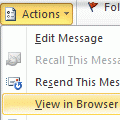
Printing in Outlook sucks. But if the message is in HTML format, not all is lost. Open the message, click Other Actions button and choose View in Browser. Now you can print the message using the browser's much better print options, such as controlling the pages you print or printing a selection.As with all workarounds, there is one potential drawback - you won't have an … [Read more...] about Tip 404: Printing Workaround in Outlook 2007 (and up)