![Diane Poremsky [Outlook MVP]](http://www.outlook-tips.net/images/2014/MVP_BlueOnly.png)
An Outlook user asked how to create a search for a messages sent to or from a domain (eg "@company.com") and include not only email sent to and from himself, but also messages that he was CC'd on.There are three options which will work to varying degrees:1. A search folder. Choose the 'To or From' predefined search folder and type the domain (microsoft.com format will … [Read more...] about Tip 943: Search for Email Sent To or From a Domain
querybuilder
How to do a Boolean Search in Outlook
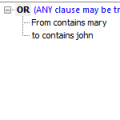
The find dialog in Outlook 2003 and earlier does not support "AND" searches. Multiple words are searched using the "OR" operator. However, you can do a Boolean search with the AND operator using Advanced find. This same method works with Views (for Filters and Automatic formatting) and Search folders (Outlook 2003/2007/2010). First you need to enable QueryBuilder by adding … [Read more...] about How to do a Boolean Search in Outlook
Using Microsoft Outlook's Advanced Filters
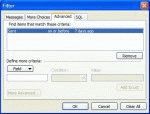
Outlook's Filter dialog gives you powerful filtering options. Once you understand how to write good filters, you can use the same criteria in Advanced Find, Views, Automatic Formatting for Views, or Outlook's Search folders. Note that you can't import/export the filters, you need to recreate them to move them between the different uses. While you can enter criteria on … [Read more...] about Using Microsoft Outlook's Advanced Filters
Tip 49: Creating Advanced Filters
Outlook has a very powerful filter available to use with Advanced Find, Views, Automatic Formatting or Search Folders. You can add conditions on one or more of Filter's tabs and the conditions are joined with AND. In many fields you can use AND or OR operators within the same criteria:Name contains Sue or BillSome fields will need a comma for OR: Subject contains … [Read more...] about Tip 49: Creating Advanced Filters