![Diane Poremsky [Outlook MVP]](http://www.outlook-tips.net/images/2014/MVP_BlueOnly.png)
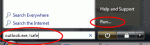
If you found this page because Outlook 2010 is opening in Safe mode since December 8 2015, see Outlook 2010 runs in Safe Mode after Update When something isn't working right with Outlook we often tell users to start Outlook in safe mode or using the /safe switch. This loads Outlook without many of the customization files and add-ins loaded. If Outlook works correctly in Safe … [Read more...] about How to start Outlook in safe mode
startup
How to use Outlook's Command line switches

Most, if not all, of these switches will work with all versions of Outlook, including the newest version (currently Outlook 2016). Don't forget to use the correct path to your version of Outlook.exe. When you're having problems with Outlook you may be told to start Outlook using a specific command line switch. To do this: Close Outlook. At the Start menu, Run … [Read more...] about How to use Outlook's Command line switches
Tip 16: Changing Outlook's Startup Folder
I get a lot of questions like this:Can I get Outlook to open in [some other folder] so that I can see [things] without having to first click the Outlook shortcut?You sure can!One of my favorite features in Outlook is the ability to start in any folder. Outlook 2003 (and up) supports any folder in your mailbox or personal stores (*.pst), including search folders … [Read more...] about Tip 16: Changing Outlook's Startup Folder