![Diane Poremsky [Outlook MVP]](http://www.outlook-tips.net/images/2014/MVP_BlueOnly.png)
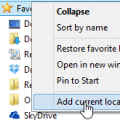
A user discovered the Recent Documents link is missing from the Insert File dialog:I recently upgraded to Windows 7, replacing Windows XP. When I attached a recent document while in Outlook on Windows XP, I just had to click on the "Attach File" button and select "Recent Documents" to see the documents I recently created and attach them to my email message. I cannot find … [Read more...] about Tip 1095: Add Recent Documents link to Insert File dialog
windows 7
Tip 1004: The Case of the Missing Reminder Window Solved

Over the last couple of weeks, I've had a lot of questions about Outlook reminder windows not opening or being "stuck" to the task bar. The common thread is that when the user clicks on the reminder window, it won't come up on screen.Outlook developed a problem I can't seem to get to the bottom of. The reminders window stays attached to the task bar and will only appear as … [Read more...] about Tip 1004: The Case of the Missing Reminder Window Solved
Tip 986: Link to a Draft Message
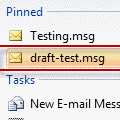
Foggy posed a question in our Outlook Forums, asking about linking to a message in drafts. While it is possible to link to Outlook messages, it's less useful to link to a draft, as the draft disappears once it is sent, rendering the link dead.Foggy came up with this method for easy access to message he's working on thorough out the day.In Outlook 2007 or 2010 and … [Read more...] about Tip 986: Link to a Draft Message
Does Outlook work on Windows 7, 8 or Windows 10?
Manufacturers and retailers often offer the current version of Office with the purchase of a new computer, sometimes with a discount. Should you purchase the new version or save your money and keep the old (and less secure) version? While Microsoft may say the older Office versions are "not compatible" or "not supported" on the current version of Windows, this doesn't … [Read more...] about Does Outlook work on Windows 7, 8 or Windows 10?
Tip 723: Don't use Compatibility Mode
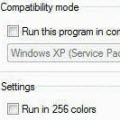
We're seeing more and more errors caused by compatibility mode. I couldn't understand why users were even touching the compatibility mode settings until someone said they ran the Troubleshoot Compatibility utility in Windows and IT made the changes. Yikes.When you right click on the application shortcut, one of the options is Troubleshoot compatibility. DO NOT use this. … [Read more...] about Tip 723: Don't use Compatibility Mode