![Diane Poremsky [Outlook MVP]](http://www.outlook-tips.net/images/2014/MVP_BlueOnly.png)

Following the installation of the November 10 2015 updates, users may have problems with Outlook crashing when they view HTML messages. Windows 7 64-bit is definitely affected; other versions of Windows may be affected as well.This is caused by Security Update for Microsoft windows (KB3097877). Outlook should work correctly after this update is removed. If the problem is … [Read more...] about Outlook crashes when viewing HTML Messages
windows
Tip 984: Hiding the Outlook icon in the Notification Area
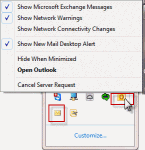
I hate unwanted Notification icons. I can't find any Option that will get rid of the Outlook icon. Outlook has two icons it adds to the notification tray: the Outlook icon and the New unread message envelope icon. The envelope icon can be disabled in Options but the Outlook icon cannot be disabled, only hidden. The Outlook icon will change throughout the day, so you can … [Read more...] about Tip 984: Hiding the Outlook icon in the Notification Area
Tip 878: Outlook dialogs don't display properly
We see questions like these each week: The Options dialog does not fit on the screen, so many of the functions remains hidden. The scroll bars are missing from the notes field in Contacts This is the result of the display settings in Windows. Either the screen resolution is set too low or the PPI percentage is set too high. In Windows 7, right click on the … [Read more...] about Tip 878: Outlook dialogs don't display properly
Save an Outlook Message as HTML (and Delete the Folder)
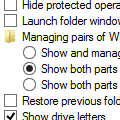
When you save a message as HTML in Outlook 2007 (and 2010, 2013), Outlook creates a matching (and annoying) folder containing XML and THMX files. (Creating a signature creates this folder and file set as well.) For most users, deleting the folder also deletes the HTML page. This is because the default setting for managing web pages and folders is to show and manage them as a … [Read more...] about Save an Outlook Message as HTML (and Delete the Folder)
Using Outlook 2000 on Windows 7 (or Vista)
Do not enable compatibility mode - this is not needed and will cause problems with any version of Outlook. Outlook 2002, 2000, 98, and 97 are not supported on Vista. If you choose to install any of these applications you should expect errors and annoyances. The better known problems for Outlook 2000 are listed below but there may be others I'm not aware of. See Outlook on … [Read more...] about Using Outlook 2000 on Windows 7 (or Vista)