![Diane Poremsky [Outlook MVP]](http://www.outlook-tips.net/images/2014/MVP_BlueOnly.png)
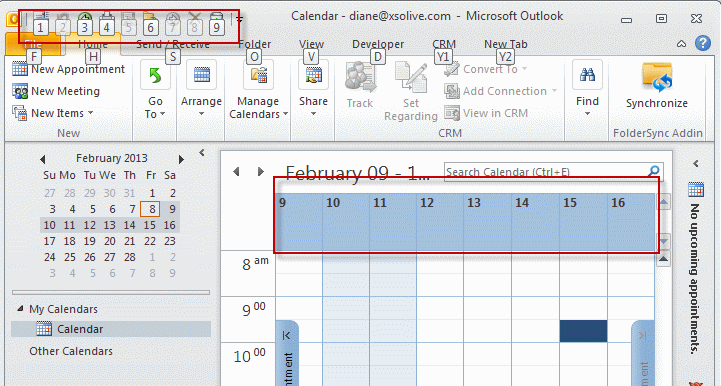
In Outlook 2010 and Outlook 2013 the Alt+n shortcuts do double duty. In any module, Alt+ a number works as a shortcut for the Quick Access Toolbar (QAT) buttons. In the Calendar Alt+ a number is used to display 1 to 10 consecutive dates on the calendar.
Although it seems like you can't use the QAT shortcuts in the calendar, it's all in the timing.
If you want to display 1 to 10 days in the calendar press Alt and the number key at the same time.
If you want to use the QAT shortcut, press Alt then press the number key after you see the shortcut hints on the screen.
Published February 18, 2013. Last updated on February 8, 2013.