![Diane Poremsky [Outlook MVP]](http://www.outlook-tips.net/images/2014/MVP_BlueOnly.png)
When sending an email to a person you can type in the first few letters in the TO: area and the name will automatically appear from cache names. Is there a way to clear the cache of names from automatically appearing in the TO…?
Beginning with Outlook 2002, Outlook added the Autocomplete feature to remember frequently used addresses. When you send a new message or reply to one, the address is remembered by Outlook and the next time you send a message to that person, you can type just a few letters and it completes for you.
Occasionally, you'll have a bad address in the cache or just have addresses in the list you don't want saved and will want to remove them from the cache.
There are two ways to clear the autocomplete cache. You can delete individual names as they come up just by selecting the name using the arrow keys then pressing the Del key. In Outlook 2010 and later, you can use the mouse and click the x beside the names to remove them from the list.
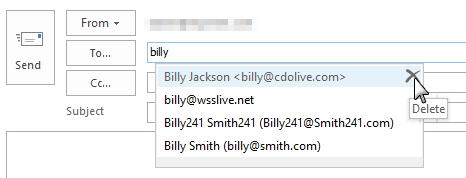
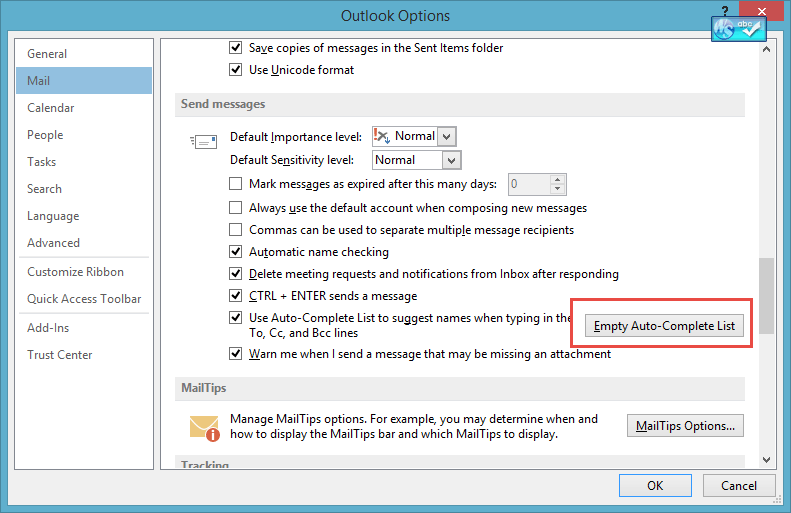
If you want to delete the entire autocomplete cache, you can click a button in Options (Outlook 2010 and newer) or delete the cache file from your hard drive.
Open the Options dialog (File > Options) and about halfway down the Mail page is the Empty Auto-Complete List button.
In older versions of Outlook you’ll need to delete the cache file from the hard drive.
The autocomplete e-mail cache used by Outlook 2002 through Outlook 2007 is stored in a file with the extension *.nk2. You can clear the entire cache by deleting the *.NK2 file for your profile. In Windows 7 and up, it’s located at C:\Users\username\AppData\Local\Microsoft\Outlook\. In Windows XP or 2000, it's in the hidden folder C:\Documents and Settings\username\Application Data\Microsoft\Outlook. Outlook will create a new NK2 or cache file the next time you use it.
The cache file used by Outlook 2010 and 2013 is stored in an XML file, located at C:\Users\username\AppData\Local\Microsoft\Outlook\RoamCache.
%localappdata%\microsoft\outlook\
Delete or rename the NK2 file or RoamCache folder then restart Outlook.
Export the cached names
While the vast majority of users have no need to view or edit the cache, since removing old addresses requires just the Del key (after selecting the entry using the arrow keys), some sites may have good business reasons for viewing or exporting the addresses contained in the cache file.
Microsoft hasn't released an editor for the cache file, but 3rd party cache utilities exist that will export the cached names to a CSV file. See Auto-Complete Cache Utilities for a list of utilities.
More Information
For more information about the Auto-Complete List, see the following articles at Slipstick.com
Suggested Contacts and Auto-Complete Lists
Complete or Nickname Cache (*.NK2)
Outlook Contacts, Address Book, and Autocomplete
Moving Outlook's auto-complete address list to a new account
Outlook Email Address Auto-Resolution vs. Auto-Complete
Published June 21, 2004. Last updated on April 2, 2014.