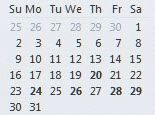
Tip 171: Selecting Calendar Dates

August 16, 2004
By

You can hold Shift or Ctrl and select days or weeks in the navigation calendars to control how many days are shown. It works with any of the Day/Week/Month views but you are limited to 14 days or 5 weeks total, depending on your view.

Related posts:

« « Tip 170: Run Rules Now
Tip 172: Right Click Everywhere » »

Leave a Reply

Your email address will not be published. Required fields are marked *

*


Outlook Daily Tips by Email

*  Your Email Address:

Resources

Ask questions and share your knowledge in Outlook Forums.

More Outlook and Exchange articles available at Outlook and Exchange Solutions Center

Follow me on:

Follow @Outlooktips on Twitter   Join Outlooktips on Facebook


Subscribe to our Exchange Messaging Outlook weekly newsletter

*  Email Address: