
![Diane Poremsky [Outlook MVP]](http://www.outlook-tips.net/images/2014/MVP_BlueOnly.png)
It seems like everyone is accidentally turning on paragraph marks lately. It's easy for many people to get into the "Show all formatting" mode and difficult for many to figure out how to get out of it.
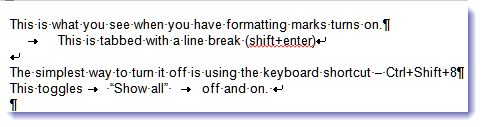
The easiest way to disable this is using the keyboard: Ctrl + Shift + 8 will toggle the formatting marks off and on. This works in all versions of Outlook (and Word). You can also disable (or enable) this from the Toolbar or Options dialog.
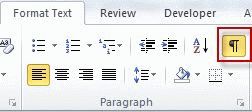
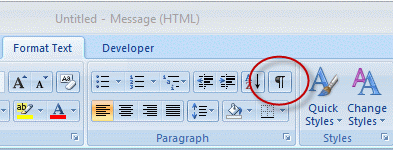
While it's much quicker to toggle the marks off and on using the keyboard, if you prefer to use a mouse, look for the paragraph icon on the Formatting toolbar or ribbon. When it's highlighted, marks are displayed.
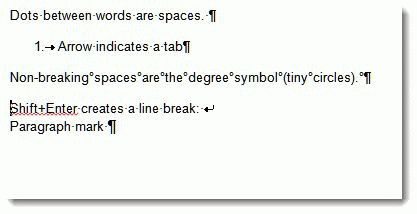
 When paragraph marks are turned on spaces, tabs, and line breaks are shown as dots or arrows. When you are showing all formatting, you'll see dots between words (for spaces), the pilcrow mark at the end of paragraphs, a 'left turn' arrow for line breaks, and arrows for tabs.
In Outlook 2016, 2013, 2010, and 2007, look on the Format Text ribbon – the pilcrow button is in the paragraph section:
You can also change the setting in Options. This is useful if you want to see some marks but not others.
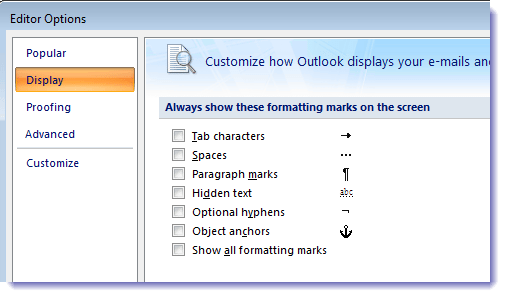
In Outlook 2010 and newer, open a message then go to the File, Options dialog. In Mail options, click Editor Options.
In Outlook 2007, open a message and click on the Office icon, then choose Editor Options at the bottom of the dialog. Select Display.
In Outlook 2003 and older when Word is your editor, open a message and go to Tools, Options. The setting is on the View tab, just as it is in Word.
Published May 25, 2011. Last updated on May 5, 2017.