
![Diane Poremsky [Outlook MVP]](http://www.outlook-tips.net/images/2014/MVP_BlueOnly.png)
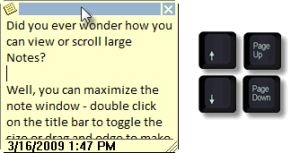
Did you ever wonder how you can view or scroll large Notes?
Well, you can maximize the note window – double click on the colored 'title' bar to toggle the note to full screen or drag and edge to make it bigger.
But what if you want to keep the note more "note sized" and view the contents of the note? Without scroll bars, how do you do it?
Easy, you can move up and down using the arrow and the page up and page down keys to move the cursor through the text. You can also scroll through the text by selecting the text and pulling the mouse up or down (to select all of the text).
Published March 7, 2008. Last updated on October 1, 2013.