![Diane Poremsky [Outlook MVP]](http://www.outlook-tips.net/images/2014/MVP_BlueOnly.png)
Do you need to always request read receipts for some addresses you send messages to, but not for all messages?
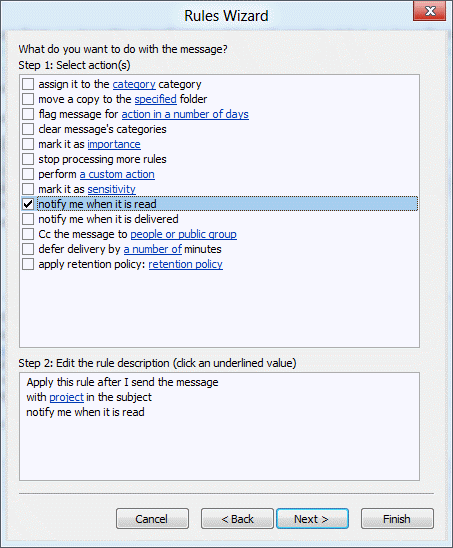
You can do this using an "After sending rule". This method works in all versions of Outlook that have the "notify when read" action (which is all 'current' versions, at least through Outlook 2013).
- Open Rules Wizard
- Select the option to start from a blank rule
- Choose the apply rule on message you send
- Enter the condition(s) you want to use then click Next
- Choose the Action to "notify when read"
- Click Next and complete the wizard
- Save the rule and Ok your way out of the Rules Wizard
Now every message you send that meets the condition of the rule will have read receipts requested.
If you want receipts only from certain domains, use the instructions at Creating rules that apply to an entire domain to create a rule for the domain and choose the Action ‘notify me when read’.
Published October 5, 2004. Last updated on May 8, 2014.