Tip 605: Recurring and Multiday Events

April 8, 2009
By

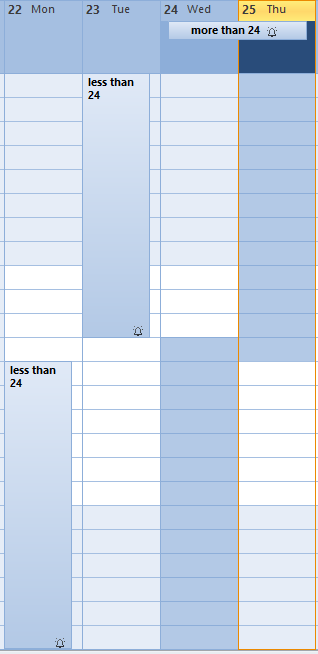
When you have an appointment spanning 2 days at the top of the calendar, the appointment is longer than 24 hours.  
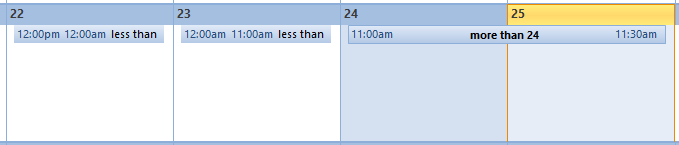
 
If you make a recurring appointment that is under 24 hours, the appointments will be split, appearing like single appointments on each day.
Related posts:

« « Tip 604: Using Send To menus
Tip 606: Autoreply Rules » »

2 Responses to Tip 605: Recurring and Multiday Events

  1. Carol on July 12, 2011 at 12:45 pm

    I am scheduling a meeting to be held 3 times from September until May. Is it possible to do this as recurring appointment and if so, how? Thank you.

  2. Diane Poremsky on July 12, 2011 at 1:21 pm

    Does it fit a pattern, like first Thursday or every 4th week? If not, you can’t make it recurring. Well, you could, but you’d need create exceptions. With just 3 occurrences, separate appointments would be better.

Leave a Reply

Your email address will not be published. Required fields are marked *

*


Outlook Daily Tips by Email

*  Your Email Address:

Resources

Ask questions and share your knowledge in Outlook Forums.

More Outlook and Exchange articles available at Outlook and Exchange Solutions Center

Follow me on:

Follow @Outlooktips on Twitter   Join Outlooktips on Facebook


Subscribe to our Exchange Messaging Outlook weekly newsletter

*  Email Address: