
![Diane Poremsky [Outlook MVP]](http://www.outlook-tips.net/images/2014/MVP_BlueOnly.png)
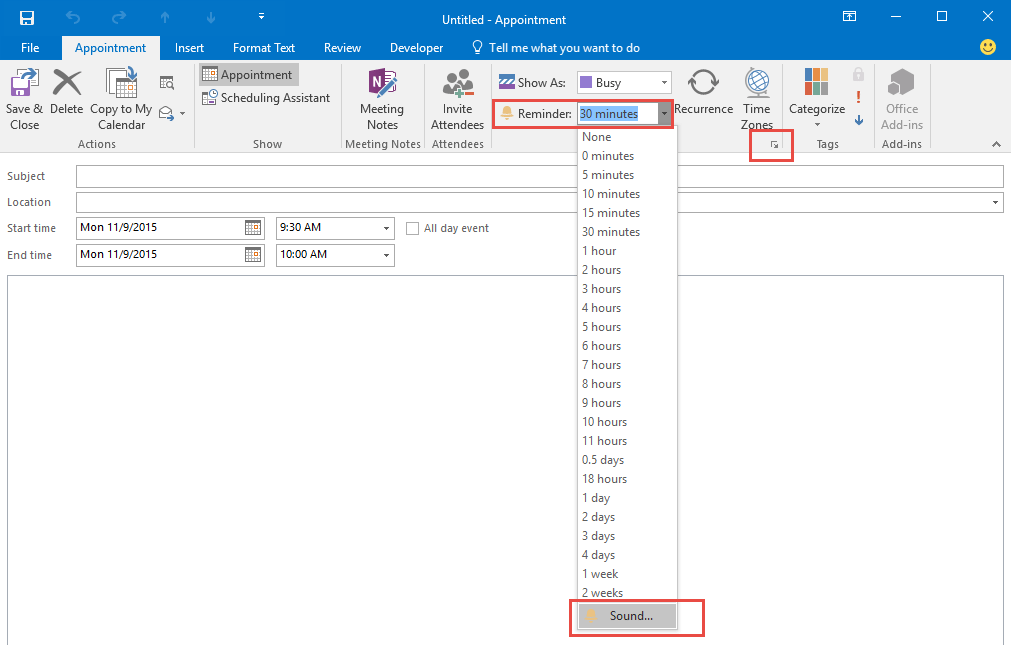
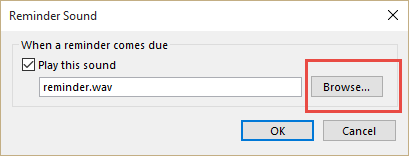
Did you know you can set different reminder sounds for each appointment? It’s easy, just click the sound button when setting the reminder and choose a different sound.
In Outlook 2007 and newer, click the expand arrow  on the right side of the Options chunk to access the sound dialog or select it from the bottom of the Reminder Time selector.
Note: Recurring events will all use one reminder sound.
Where do you find the sounds?
Anywhere! Windows includes some sounds at C:\Windows\Media and many programs install their own wav files. You can also download sound files from the Internet or make your own.
Published August 5, 2009. Last updated on November 9, 2015.