
Tip 768: OL2007: Line Wrap in Calendar Printout

Note

This bug was (finally) fixed by the January 2011 update. If Outlook is fully updated, lines should wrap properly in a printed monthly calendar.

In older versions of Outlook, users could print a monthly calendar and long subjects wrapped to multiple lines.  This was broken in Outlook 2007 – if you wanted the subject to wrap, you needed to use the Calendar Printing Assistant.

Following a recent update (MS10-045: Description of the security update for Outlook 2007: July 13, 2010
), wrapping is back. Unfortunately, lines break in the middle of words and the end time is missing.

This bug (bad line breaks and no end times) was first introduced in an April hotfix (Description of the Office Outlook 2007 hotfix package (outlook-x-none.msp): April 27, 2010
) and the July update includes that hotfix, which explains why we haven't seen many complaints about it prior to now.

The bad line breaks & no end times bug should be fixed in a future update (while keeping wrapped lines). If the broken words really annoy you or you need the end time, you can uninstall the July update. The security issue it addresses is only triggered by opening attachments so it’s not overly risky to uninstall it but there may be other issues fixed by it that are more important to you. See KB 981048 for a list.

Screenshots:

Outlook 2003 monthly calendar printout
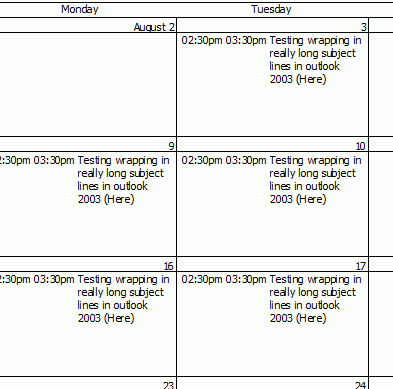
Outlook 2003 monthly calendar printout

Outlook 2007 before the bad update
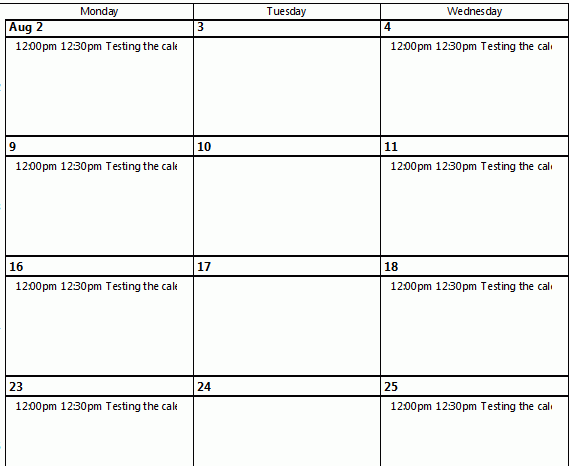
Outlook 2007 before the bad update

Outlook 2007 after installing the bad update
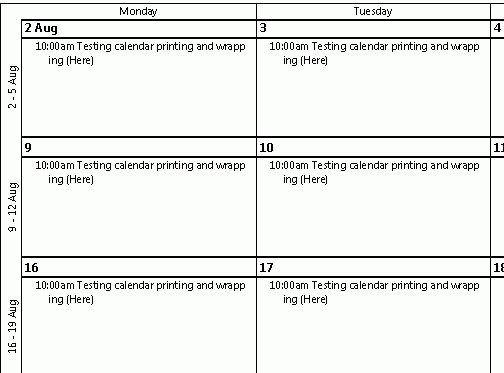
Outlook 2007 after installing the bad update

  11 comments for “Tip 768: OL2007: Line Wrap in Calendar Printout

  1. Bob O'Gorman
    July 7, 2011 at 8:14 am

    thanks for this information – any idea when a hotfix for Outlook 2010 for Line Wrap in Calendar Printout might be ready?

  2. outlooktips
    July 7, 2011 at 8:26 am

    Sorry, no, I haven't heard anything. They tend to release updates towards the end of the month, so check the tips at the end of each month - i will post it as a new tip when its available.

  3. Jose
    August 1, 2011 at 8:38 pm

    Anything yet? It's August now.

  4. Diane Poremsky
    August 1, 2011 at 9:26 pm

    No, nothing yet. (The lines wrap in 2010, they just don't break right. )

  5. Linett
    August 31, 2011 at 12:12 pm

    Any update on when the printing issues will be resolved for Outlook 2010, 64 bit? Specifically regarding monthly views.

  6. Diane Poremsky
    August 31, 2011 at 12:36 pm

    What specific issue needs resolved? In SP1, Start and end times print, lines will wrap but words don't break correctly. I think some other things were fixed but can't recall what, offhand.

  7. Linett
    August 31, 2011 at 12:55 pm

    Thanks. Perhaps I didn't download the correct patch or am just doing something incorrectly.

    I'm looking to print monthly calendars in Outlook 2010 (64 bit), where all events are listed in the date box. Currently, I'm going to: Print/Print Options/Monthly Style but it will only print a few appts/day. I also need to print 7 days/wk in the monthly view.

    Any insight would be greatly appreciated.
    Thanks

  8. Diane Poremsky
    September 1, 2011 at 6:17 am

    The native outlook calendar won't include all appt unless the boxes are tall enough (maybe on 11x14 portrait) - the calendar printing assistant is an option for others but you have 64-bit outlook. http://www.slipstick.com/addins/calendar_print.asp has some tools that do a better job. I recommend trying one of the word templates.
    7 days a week should print - unless you enabled the option for weekdays only. That's in print setup.

  9. Diane Poremsky
    September 1, 2011 at 6:23 am

    BTW - i don't expect outlook to change how it handles overflow and i don't think any of the 2 pages options will split a calendar to put 2 weeks per page - they split vertically, with mon- wed on one page.

  10. Linett
    September 1, 2011 at 5:12 pm

    Thanks for the insight. You mentioned a Word template solution. Is there a link you could direct me to which would explain in better detail?

    Thanks!

  11. Diane Poremsky
    September 1, 2011 at 5:42 pm

    Download the template from here: http://www.slipstick.com/addins/calendar_print.asp then double click to open it in owrd,. (you'll need macro security set to allow macros - disable with notification should allow you to enable macros.

Leave a Reply