Tip 769: Crash on Reply or Forward

August 10, 2010
By

I’ve heard a lot of complaints about Outlook 2010 crashing on a reply or forward. This is caused by not having a folder set as the default delivery location for the account.

With Outlook closed, go to Control panel, Mail and select Show Profiles. Select your profile and click Properties button, then E-mail Accounts. On the E-mail tab, select your POP3 account, and then click Change Folder button and select a delivery folder.

You can also do this from within Outlook by going to file, Account settings and making the change on the Email tab. You will need to restart Outlook.
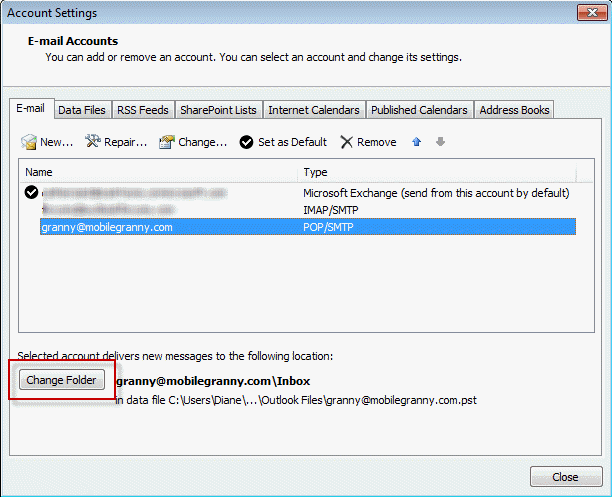
Outlook crashes when you try to send email messages because of a nonexistent delivery location setting in your profile
http://support.microsoft.com/default.aspx?scid=kb;en-us;2298962

Related posts:

« « Tip 768: OL2007: Line Wrap in Calendar Printout
Tip 770: Outlook 2010 & Blackberry » »

One Response to Tip 769: Crash on Reply or Forward

  1. ryan on March 16, 2012 at 7:20 am

    Hi,

    I’m having this problem with Outlook for Mac 2011, but don’t have the options to direct results to a specific folder. i’ve completely reinstalled Office for Mac and deleted my old identities in the process. This is still an issue with my Yahoo POP account. Any suggestions?

    many thanks,

    ryan

Leave a Reply

Your email address will not be published. Required fields are marked *

*


Outlook Daily Tips by Email

*  Your Email Address:

Resources

Ask questions and share your knowledge in Outlook Forums.

More Outlook and Exchange articles available at Outlook and Exchange Solutions Center

Follow me on:

Follow @Outlooktips on Twitter   Join Outlooktips on Facebook


Subscribe to our Exchange Messaging Outlook weekly newsletter

*  Email Address: