![Diane Poremsky [Outlook MVP]](http://www.outlook-tips.net/images/2014/MVP_BlueOnly.png)
I get a lot of questions like this:
Can I get Outlook to open in [some other folder] so that I can see [things] without having to first click the Outlook shortcut?
You sure can!
One of my favorite features in Outlook is the ability to start in any folder.
Outlook 2003 (and up) supports any folder in your mailbox or personal stores (*.pst), including search folders while Outlook 2002 and earlier include only the default folders in the Start in list. You’ll need to use the /select switch to open Outlook to folders not listed in the dialog.
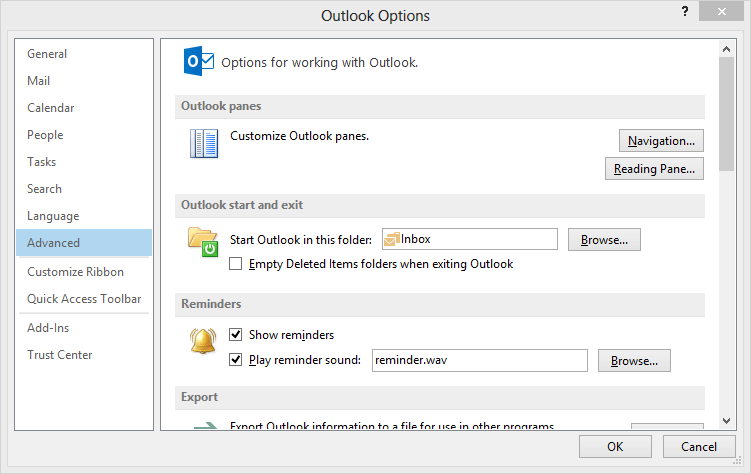
Outlook 2010 and 2013
In Outlook 2010 and 2013, you'll need to click on File tab, then Options and select Advanced . Select a new start up folder from the folder picker at Start Outlook in this folder: .
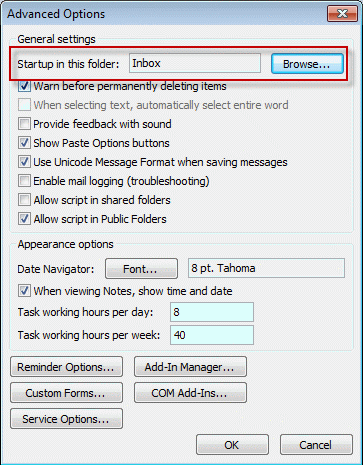
Outlook 2003 and 2007
In Outlook 2003 and 2007, you'll set this in Tools, Options, Other tab, Advanced – select the start up folder at the very top of the dialog.
Outlook 2002 and older
Users of older Outlook versions are limited to using folders in the default data file and will need to create a shortcut pointing to another folder and use the shortcut to open Outlook.
Use a command line switch
You can open any version of Outlook to any folder using a desktop shortcut or command line switch.
Create a desktop shortcut or enter the command line in Start Menu, Run. (You can press Windows Key + R to open the Run command.)
The command line will look like:
Outlook.exe /select outlook:CalendarNew
(Replace "calendarnew" with the folder name (and path as needed))
In a few cases, you may need to make a shortcut using the full path to Outlook. The command line will look something like:
"C:\Program Files\Microsoft Office\OFFICE11\outlook.exe" /select Outlook:Hotmail\Inbox
Tip: To get the proper path for any folder in older versions, show the Web toolbar and select the folder. Copy the path from the Address bar.
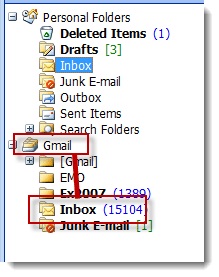
When you use the shortcut, you can use any folder in the profile. If the folder is in a different data file, you need to format the path like this:
outlook:datafile-name-in-folder-list\Inbox
For example, to open the Gmail Inbox in the screenshot, you would use this for the path:
outlook:Gmail\Inbox
To start up in the Unread Search folder in a non-default pst, use the following switch:
outlook.exe /select "Outlook:\pst_name_in_folder_list\Search Folders\Unread Mail"
Published August 12, 2003. Last updated on October 23, 2013.