![Diane Poremsky [Outlook MVP]](http://www.outlook-tips.net/images/2014/MVP_BlueOnly.png)
As I mentioned in an earlier tip, there is a bug in how Gmail handles Outlook 2010 saving sent items in the Gmail sent folder. Gmail picks up the sent item and resends it, resulting in duplicate messages being sent.
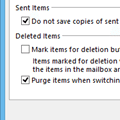
The fix: disable the option to save sent items in the IMAP account. Go to File, Account Settings, double-click on the Gmail account then More Settings. On the Sent Item tab, choose not to save sent items. (Gmail will save a copy.)
There is only one problem with this fix: if you send BCC messages, the addresses you BCC'd are not visible when you view the sent item. Not in Outlook, not in Gmail's sent folder online.
The fix: Choose "Save sent items in the Sent folder on this computer." The copy in the local folder will show the BCC addresses and Gmail will save a copy of the sent message online (but without the BCC addresses).
Tip 863: Duplicate Sent Messages in Outlook 2010
Published July 12, 2011. Last updated on May 8, 2014.