Tip 96: Hide ‘Type a question’

February 16, 2004
By

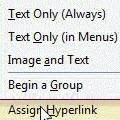
Hide the Type a question combobox on your Office toolbars using the customize menu. Open the Customize dialog using Tools, Customize then right click on Type a question and remove the checkbox.
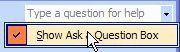
Repeat for each window you want to remove it from

Related posts:

« « Tip 95: Locating Read Receipts
Tip 97: Using Custom Views » »

Leave a Reply

Your email address will not be published. Required fields are marked *

*


Outlook Daily Tips by Email

*  Your Email Address:

Resources

Ask questions and share your knowledge in Outlook Forums.

More Outlook and Exchange articles available at Outlook and Exchange Solutions Center

Follow me on:

Follow @Outlooktips on Twitter   Join Outlooktips on Facebook


Subscribe to our Exchange Messaging Outlook weekly newsletter

*  Email Address: