![Diane Poremsky [Outlook MVP]](http://www.outlook-tips.net/images/2014/MVP_BlueOnly.png)
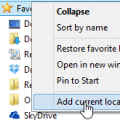
A user discovered the Recent Documents link is missing from the Insert File dialog:I recently upgraded to Windows 7, replacing Windows XP. When I attached a recent document while in Outlook on Windows XP, I just had to click on the "Attach File" button and select "Recent Documents" to see the documents I recently created and attach them to my email message. I cannot find … [Read more...] about Tip 1095: Add Recent Documents link to Insert File dialog
attachments
Tip 1035: Attachment extensions are duplicated (hotfix available)

Update November 8 2012 This issue was fixed in both Outlook 2007 and Outlook 2010 by recently released hotfixes.Outlook 2007: install the Word 2007 hotfix in Description of the Word 2007 hotfix package (Wordconv-x-none.msp, Word-x-none.msp): October 30, 2012Outlook 2010: install the Word 2010 hotfix described in Description of the Word 2010 hotfix package … [Read more...] about Tip 1035: Attachment extensions are duplicated (hotfix available)
Tip 1010: Send as an attachment doesn't include message text
Several users have discovered that when they use the File, Send as Attachment command in another application, only the attachment is sent, not the message body they typed in.Others may notice that when they begin to compose a message then save it to drafts, when the user reopens and edits it, then immediately sends it, the original version in drafts may be sent, not the … [Read more...] about Tip 1010: Send as an attachment doesn't include message text
Tip 996: How to send a forwarded draft message in Outlook
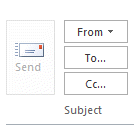
It's a surprisingly common scenario: a user creates a draft message and forwards it to a coworker or manager for approval or additional comments. The message is then supposed to be sent. Except, it can't be sent because the Send button is grayed and disabled. There is no Send button because Outlook doesn't see it as a draft message, it sees it as an attached file. … [Read more...] about Tip 996: How to send a forwarded draft message in Outlook
Tip 973: Outlook continues to access a folder after attaching a file
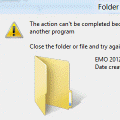
We've all ran into this problem at least once or twice: After you save a message or attachment to a folder on your hard drive, or attach a file to an Outlook email message, you can't move, delete, or rename the Windows folder the file is stored in. When you try to move, delete, or rename the folder, you receive an error message telling you the file is being used by another … [Read more...] about Tip 973: Outlook continues to access a folder after attaching a file