![Diane Poremsky [Outlook MVP]](http://www.outlook-tips.net/images/2014/MVP_BlueOnly.png)
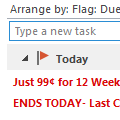
An Outlook user had a question about the Task List that appears at the bottom of the Day or Week calendar view:I would like to see more columns (e.g. task priority) in the task section of calendar view (in e.g. weekly view mode) and sort the tasks in that list (e.g. by priority). Currently you can drag and drop to sort the order, but that's not much use if you can't see the … [Read more...] about Sorting the Task List in Outlook’s Calendar
calendar
Tip 1126: Copy and paste Appointments into new time slots
This question came from an Outlook user who recently upgraded to Outlook 2013:In Outlook 2013, I create an appointment on a specific day with a specific start and end time, set a reminder, etc. and Save it. When I go to the month view, I can click on the appointment to select it, then type Ctrl+C to copy it. I select another date and paste it using Ctrl+V. Except it … [Read more...] about Tip 1126: Copy and paste Appointments into new time slots
Tip 1125: Add new holidays to Outlook Calendar and remove old holidays
This question about Outlook's Holidays came up this week.I have Outlook 2010, and my holidays ended 12/31/13. If I add holidays they will go backwards as well as forward, I don't want the old holidays and I need to keep my past appointments, so I can't archive the calendar to remove the old holidays. And I'm sure the past holidays will be duplicated when I add the new … [Read more...] about Tip 1125: Add new holidays to Outlook Calendar and remove old holidays
Tip 1111: Outlook 2013 hotfix: Calendar peek and more
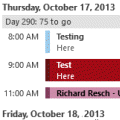
Among the issues that the Outlook 2013 hotfix that came out this week addresses is one that annoys many users: the Calendar Peek displays appointments for the selected day only, not the next several appointments.No more! The hotfix restores the behavior of the Calendar Peek to the behavior users were used to with the To-do Bar in older versions, displaying appointments on … [Read more...] about Tip 1111: Outlook 2013 hotfix: Calendar peek and more
Tip 1108: Add meeting requests to Calendar as Tentative
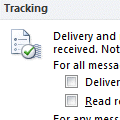
I have a user who is managing several calendars on her Outlook. When she sends a meeting request to the users, she can see the appointments updated on her screen in those respective calendars except for one. One shared calendar doesn't update until the user manually accepts it in his Outlook. How can I solve this?Check the user's auto-accept settings in File, Options, … [Read more...] about Tip 1108: Add meeting requests to Calendar as Tentative