![Diane Poremsky [Outlook MVP]](http://www.outlook-tips.net/images/2014/MVP_BlueOnly.png)
Would you like to be able to see the time you replied to or forwarded a message in your message list view? You can, using an Extension form configuration file (*.CFG) that exposes the hidden Extended MAPI property PR_LAST_VERB_EXECUTED, which holds the replied to/forwarded times. The best part is, you don't need to have a clue about what I just said. :) Michal Bednarz of … [Read more...] about Tip 433: See Replied to Time
custom forms
Tip 326: Change the Contacts Tab Order
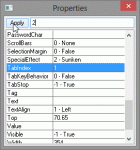
Ann asks:Is there a way to change the order of the tabs as you enter new information for a new contact...i.e, it tabs from Name to Title to Company then it jumps to the phone/fax/mobile fields and then back to the address. Can it be changed to tab from Name to Title to Company and then directly to address...then to phone fields?Yes, you can change the tab index … [Read more...] about Tip 326: Change the Contacts Tab Order
Tip 202: Publishing Custom Forms Questions
Q: I tried the date form sample on your site and it doesn't work. A: Forms containing scripts must be published. This prevents someone from sending you a form containing virus-like scripts. The scripts won't work unless you publish the form. You won't be warned that it needs to be published, so if a form (or template) doesn't work as expected, try publishing it. Q: Where … [Read more...] about Tip 202: Publishing Custom Forms Questions
Tip 77: Easy Access to Templates within Outlook
Many users don't like to use templates because it takes too many steps to get to the template: in Outlook 2010 and up, New Items > More Items > Choose Form and browse the User Templates in File System; or in older version Tools > Forms > Choose Forms, look in User Templates in File System.Fortunately, you can store the templates in Outlook so the templates are always … [Read more...] about Tip 77: Easy Access to Templates within Outlook