![Diane Poremsky [Outlook MVP]](http://www.outlook-tips.net/images/2014/MVP_BlueOnly.png)
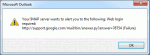
This bug is the result of Outlook opening too many connections to the IMAP server. Gmail sets a limit to the number of connections that can be opened and Outlook wants more. This will be fixed in RTM. Until then, the best solution is to remove the account from the Send and Receive Settings as described below. Outlook 2013 users discovered an annoying bug when they have a … [Read more...] about Tip 1015: Outlook 2013 and the annoying Gmail IMAP error
imap
Tip 955: Using Draft Messages in IMAP
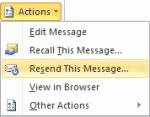
When you subscribe to a IMAP account's drafts folder, it doesn't work "as expected" in Outlook. The messages contained in the folder won't be editable in Outlook because Outlook sees the messages as sent messages, not drafts. Moving the draft messages to Outlook's local drafts folder won't make a difference: Outlook still sees it as a message that was already sent. You can go … [Read more...] about Tip 955: Using Draft Messages in IMAP
550 5.7.1 Relaying denied: You must check for new mail before sending mail.
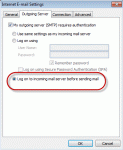
If you receive this error message: 550 5.7. < alias@domain.com >... Relaying denied: You must check for new mail before sending mail. You need to configure Outlook to check for new mail before sending mail. Lowering your "check every xx minutes" time to 8 minutes or disabling Send Immediately may reduce the frequency of this error message. This error occurs because … [Read more...] about 550 5.7.1 Relaying denied: You must check for new mail before sending mail.
Tip 890: Unintended consequences: GMail IMAP duplicate sent bug fix & BCC
As I mentioned in an earlier tip, there is a bug in how Gmail handles Outlook 2010 saving sent items in the Gmail sent folder. Gmail picks up the sent item and resends it, resulting in duplicate messages being sent. The fix: disable the option to save sent items in the IMAP account. Go to File, Account Settings, double-click on the Gmail account then More Settings. On the … [Read more...] about Tip 890: Unintended consequences: GMail IMAP duplicate sent bug fix & BCC
Tip 876: Fixed in SP1: Outlook 2010 & default IMAP accounts
Update: This hotfix is included in Outlook 2010 SP1. See Default account fix for more information and the required registry setting. The issue: When clicking on a "mailto:" on a web page or using the Send to command in other applications, Outlook opens a new email. In Outlook 2010, when the default account is an IMAP account, it uses the account assigned to the default … [Read more...] about Tip 876: Fixed in SP1: Outlook 2010 & default IMAP accounts