![Diane Poremsky [Outlook MVP]](http://www.outlook-tips.net/images/2014/MVP_BlueOnly.png)
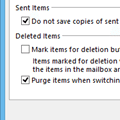
If you have a Gmail account and are getting duplicates in the Sent folder, this is because Outlook saves a sent message in the Sent message folder and some IMAP mail providers do the same, creating two sent message every time you send a message. To stop the duplicates, you need to change the sent message settings in Outlook’s More Settings dialog or change the settings on your … [Read more...] about Tip 863: Duplicate Sent Messages in Outlook 2010
imap
Tip 861: Outlook 2010: IMAP mail icon (Fixed in SP1)
Note: This hotfix is included in Outlook 2010 SP1. I don't send out many tips on Friday's but knowing how many people complained about some of bugs fixed in the latest Outlook 2010 hotfix, I thought it was worthy of an announcement. A hotfix for Outlook 2010 was released this week (April 2011) and it fixed a number of complaints users had, including IMAP users and the … [Read more...] about Tip 861: Outlook 2010: IMAP mail icon (Fixed in SP1)
Tip 830: Outlook 2010, IMAP & Send to commands
I’m hoping this will be my next-to-last post about the problem of Outlook2010’s handling of multiple accounts when an IMAP account is the default email account. (The last post will be an announcement that users can revert to the old way of handling default accounts. I don’t know if it will ever happen though.) The problem: Outlook 2010 chooses the email account to send mail … [Read more...] about Tip 830: Outlook 2010, IMAP & Send to commands
Tip 558: Move an IMAP *.PST

While its often a good idea to move a *.PST used by POP3 accounts to an easier to find locations, it’s less useful to move IMAP accounts. You don’t need to back it up, since its just a copy of you mailbox, which is stored on the IMAP server. If you need to move the *.PST, it is possible.First, close Outlook then make sure Outlook is not listed in Task Manager, Processes tab … [Read more...] about Tip 558: Move an IMAP *.PST