![Diane Poremsky [Outlook MVP]](http://www.outlook-tips.net/images/2014/MVP_BlueOnly.png)
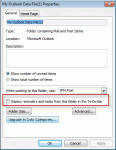
We had two questions about tasks, reminders, and flags recently. One used wanted to know how to prevent reminders and flags from his archive pst file from displaying while the other user wanted to know how to make the reminders show. I get a lot of emails and my pst files are very large (12-17GB) with just the email I get during one year. So at the end of each year I make a … [Read more...] about Tip 949: Reminders and Tasks in Other Data Files
reminders
Tip 935: Dismissing Reminders on Recurring Tasks

With the holiday season beginning, I thought it would be a good time to share this tip. A user on our Outlook-users mailing list asked how to prevent reminders from disappearing from tasks: I have several daily reminders of various tasks I have to do. What normally happens after I return from a vacation, is Outlook will pop up a reminder for the first day I miss, but … [Read more...] about Tip 935: Dismissing Reminders on Recurring Tasks
Tip 882: Outlook 2010 default reminder time bug (Fixed)
This bug is fixed in Outlook 2010 SP1 Outlook 2010 SP1 I thought I posted this bug a long time ago but search doesn't bring it up, so here goes. If it's really a duplicate, sorry. :) When users attempt to change the Calendar's Default reminder from 15 minutes to a value of 1 day or more, the new value isn't saved. It works correctly if the reminder time is under 1 day, … [Read more...] about Tip 882: Outlook 2010 default reminder time bug (Fixed)
Change the Sound used for the New Mail Alert
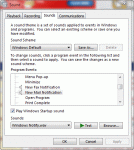
You can change the sound played for the new mail alert in the Windows Control Panel, Sound applet. (In older versions of Windows its called Sounds and Audio Properties.) This screen shot is from Windows 7, but the dialog looks very similar in other versions. Change the default sound for new mail to another sound file on your system. Or use Google (or Bing) to find .wav … [Read more...] about Change the Sound used for the New Mail Alert
View all Appointments that don't have reminders

Outlook 2007's Day/Week/Month calendar doesn't have the reminder icon, making it hard to see at a glance if you need to set a reminder. You can make it easier with a custom view that hides items without reminders. The Remind Beforehand field displays the number of minutes before an event that the reminder will fire, the Reminder field displays the bell icon when a reminder … [Read more...] about View all Appointments that don't have reminders