![Diane Poremsky [Outlook MVP]](http://www.outlook-tips.net/images/2014/MVP_BlueOnly.png)

Windows XP's logon screen lists the number of unread email messages associated with the user account. The message count is taken from all email accounts checked within the last 3 days using Outlook Express, Outlook, Messenger (Hotmail/MSN), and the MSN browser client. This includes not only your accounts, but those of anyone who used your computer to check their email.The … [Read more...] about Windows XP Unread Mail Count
windows
Send Links by E-mail in Windows XP
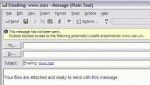
Note: This app is not needed in Windows 2003 Server (and newer operating systems) or if you have the hotfix (Q 327010) for Windows XP (but you can use it anyway). The Hotfix may be included in Windows XP SP2. In new versions of Windows, the Send link by email command inserts a text link into the message, not an attachment. It's always annoyed many people that … [Read more...] about Send Links by E-mail in Windows XP
Outlook 2000 on Windows 7: Missing WAB.dll

Outlook 2000 in Internet Only mode errors on Vista and Windows 7 because the WAB (Windows Address Book) it uses for its address book is missing. You can try copying the WAB.dll and registering it. This will fix one error but you may have other issues. Browse to C:\Program Files\Common Files\System (on your Vista or Windows 7 computer) and copy wab32.dll and wab32res.dll … [Read more...] about Outlook 2000 on Windows 7: Missing WAB.dll
Tip 749: Disabling Outlook's Tooltips and Popups
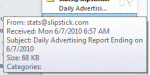
Outlook has several different tooltips, screentips or popups that annoy users: Message List When you hover over messages in Outlook a sometimes rather large screen tip pops up. This screentip shows you the fields in the view that are not completely visible in the message list. You can’t disable these screen tips, or increase the length of time the mouse hovers … [Read more...] about Tip 749: Disabling Outlook's Tooltips and Popups
Tip 582: Open With…
This is a Windows tip, not Outlook, but it’s asked often enough in Outlook forums that its worth putting in a tip. The problem goes something like this: “I’m having problems opening attachments. They open with [some program I don’t like]. How do I make them open in a program I like?” Locate a file of the affected type in your My Documents folder (save the attachment to … [Read more...] about Tip 582: Open With…