A common request is how to make recurring appointments for every x number of workdays. Unfortunately Outlook does not offer this type of recurring option. You can use a third party add-in, WS:Repeat Appointment II, to create recurrences not supported by Outlook. If this is a frequent need, its well worth the cost but if your needs are infrequent, you can use Excel to create the recurrence pattern and import it into Outlook.
Use VBA to create appointments for every xx weekday
You can either start with a blank workbook and create your own fields which will need mapped to Outlook's fields when you import it, or export your calendar from Outlook to Excel, then delete the appointments from the workbook, leaving just the field names. Or download an Excel workbook with the calendar fields and a few lines of sample data.
If you create the workbook yourself, you should use the start and end time fields, along with the subject field and the date field, of course. Any other fields are optional.
Prepare the Excel Workbook
Row 1 contains the field names.
Cell A2 contains the starting date.
Cell A3 contains the formula you need to calculate workdays: =WORKDAY(A2,4,F2:F147) The first parameter is the cell it bases the date calculation on. The second is the number of days. In my example, the calculation is for the 4th workday. The final parameter is an array of holidays. You are only required to to use the first two parameters =WORKDAY(A2,4) if you don't need to consider holidays, only weekdays.
Drag Cell A3 down to fill the cells. If the subject and time fields will be the same for each appointment, drag to fill these cells too. Use the method at Create Countdown Calendar Items to fill the subject field with consecutive numbers, such as Meeting 1, Meeting 2, etc.
Enter the dates to be skipped in Column F.
I used the "Use Custom View Data in Another Program" method to display a list of the holiday dates in Outlook, which I copied and pasted into Excel. You'll need to change the Field format in Outlook to display just the date for it to work. Do this by right clicking on the field name and choose Format columns.
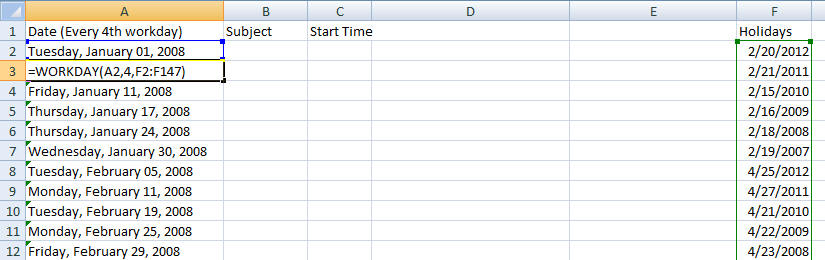
- When you are finished creating the spreadsheet, select and copy the cells you will be importing then use Paste Special, Values to paste the data in Sheet 2. By doing this you will avoid the need to make a named range.
- Save Sheet 2 using Comma Separated Value (CSV) format.
If you want to save the workbook with the formulas intact, choose Save As and save it in Excel format.
To import the appointments into Outlook
In Outlook:
- Select File, Import and Export (File, Open, Import in Outlook 2010)
- Select Import from another program or file.
- Select the program or file type. In this example, we're using Comma Separated Value (CSV)
- Browse for the file. (If the file is still open in Excel, it will cause an error.)
- Select the Calendar folder you want to Import the file into.
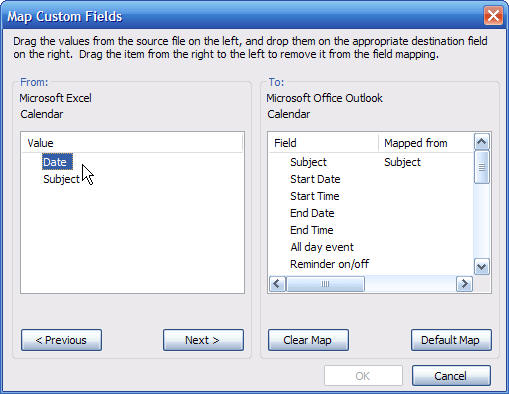
- If fields need mapped, use the Map Custom fields dialog.
- Outlook doesn't recognize Date, so I need to drag it to Start Date and Outlook adds it to the Mapped From column next to Start Date.

- Click Finish to import your items.

Thank you!! Here we are at the end of 2021 and this is still the only solution to this. You have saved me weeks of work having to enter random deadlines in manually.
Nice; I did not use the calculation but helped me to import reminders. Thanks.
is this the same for meetings?
You can't import meetings from a spreadsheet - well you could, but only as appointments. You can't add recipients via import.
Then? Where can I see the new option?
Sorry, I'm not sure which option you are asking about.
When I map the column, I don't see option to Finish. The okay button is still grayed out. What am I doing wrong?
Did you map all of the fields? If you use field names outlook uses, you won't need to map them (click the button for Default Map) - you can also get this list by exporting the calendar to a CSV then open it in Notepad.
"Subject","Start Date","Start Time","End Date","End Time","All day event","Reminder on/off","Reminder Date","Reminder Time","Meeting Organizer","Required Attendees","Optional Attendees","Meeting Resources","Billing Information","Categories","Description","Location","Mileage","Priority","Private","Sensitivity","Show time as"
Close the mapping window then select finish.
Why cant they just reference the day of the week, if the day falls on a Saturday or Sunday then it should skip to Monday. problem solved
You'd need to use a macro to do that - outlook doesn't support it.
YES OUTLOOK DOES DO THIS... go to recurrence, select MONTH on the left, then in middle select numbered day you want, then select (in drop down window - scroll UP to more options) 'Business Day".
You will be able to do what you want.
The problem with using weekday is that it's a specific day - the 3rd weekday, not every 3rd weekday. It also only does 1st - 4th + the last weekday of a month.
Why doesn't Outlook just have an option for "Fifth" workday? People have been asking for this since at least 2006, judging by my google hits....
I believe there are issues calculating it - Outlook needs to know what to do when there are only 4 of that day in a month. The last day and 4th day are easy to calculate (and last is sometimes the 5th).