![Diane Poremsky [Outlook MVP]](http://www.outlook-tips.net/images/2014/MVP_BlueOnly.png)
If you are like most folks, you get a couple phishing scams every week. While most people just delete them, a few like to report them to the company they are trying to impersonate. Microsoft has a page dedicated to helping individuals determine phishing scams, and how to report them. The problem is that most of the phishing emails contain images, which Outlook will, rightfully, … [Read more...] about Tip 222: Viewing Message Source
Tip 221: Add Senders to Contacts
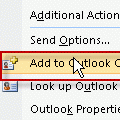
You can easily add any address (To, From, or CC fields) from any message to Outlook's Contacts by selecting the address in an opened message or preview pane header and choose Add to Outlook Contacts. This opens a new contact with the name and address fields filled in.Save to a non-default Contacts folderWhen you use the Add to Outlook Contacts command, the contact … [Read more...] about Tip 221: Add Senders to Contacts
Tip 220: Microsoft Office Outlook Live (MOOL)
MOOL is no longer available. The MOOL service was replaced by the free Outlook Hotmail Connector, which works with any Hotmail Live account. Earlier today Microsoft announced the availability of Microsoft Office Outlook Live (MOOL). What is it and do you need it? MOOL is a Hotmail subscription service that supplies a license to Outlook 2003 and the MSN Outlook connector, … [Read more...] about Tip 220: Microsoft Office Outlook Live (MOOL)
Tip 219: Using Address Bar Searches
Today's tip is another general tip that makes computing life easier. Did you know you can create your own address bar searches? These are searches you type into the Internet Explorer address bar using a keyword for the search engine and keywords for the search string. For example, I can search Outlook-tips.net for pages that mention the command line by typing: tips keyword … [Read more...] about Tip 219: Using Address Bar Searches
Tip 218: Changing the Attachment Folder
Outlook doesn't offer a way to change the folder that is opened when you use the File, Insert or File, Save menus, without changing the My Documents location other programs use. If you are using Windows 7 or Windows 8, add your favorite folders to the Favorites list. To avoid moving My Documents and providing quick access to your most used folders, you can use the … [Read more...] about Tip 218: Changing the Attachment Folder