![Diane Poremsky [Outlook MVP]](http://www.outlook-tips.net/images/2014/MVP_BlueOnly.png)

When I first started using Windows 8, I didn't think using a "Microsoft account" to log into my computer was such a good idea (and it probably still isn't) but I decided I'd give it a shot, just for a day or two. After using it for a little bit, it became one of my favorite Windows 8 features. I like syncing my desktop with my other computers a lot more than I thought I would. … [Read more...] about Tip 1074: Microsoft accounts and sharing BCM
Tip 1073: Easily disable e-mail accounts
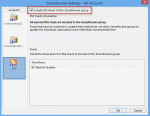
I use Outlook 2010 with multiple e-mail accounts. When I travel, I do not need to download all of the e-mail from all of the accounts. Is there an easy way to disable the e-mail accounts I do not want to collect mail for? Sure. For an occasional trip, open the Send and Receive dialog using Ctrl+Alt+S.Select the Send and Receive group Click Edit Select the … [Read more...] about Tip 1073: Easily disable e-mail accounts
Tip 1072: Enable or disable the Bilingual Dictionary
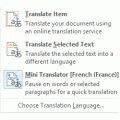
One thing I love about helping people are the chuckles from the creative ways they express their annoyance with Outlook features. I'm a firm believer in laughter is the best medicine and I can count on getting a healthy dose every day. How does one disable the Bilingual dictionary in Outlook 2010? When I hover the mouse over an email message this very aggravating dictionary … [Read more...] about Tip 1072: Enable or disable the Bilingual Dictionary
Tip 1071: Auto Preview Email in Outlook 2013
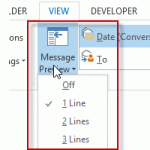
Outlook 2013 makes a change to the 3 line preview feature in older versions: you can choose 1, 2, or 3 line preview and select it from a button on the ribbon for quick changes.I see the new feature where you can set it to preview 1-3 lines of email. But I'd like to have the ability to do what I have always done in Outlook and preview just the Unread Emails. How can I … [Read more...] about Tip 1071: Auto Preview Email in Outlook 2013
Tip 1070: Proper case ribbon names in Office 2013
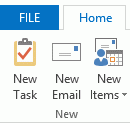
This tip comes from Rick Bretschneider, Powerpoint MVP and one of the very few things I can share from the MVP Summit last week. Do you hate the upper case ribbon names in Outlook 2013? The fix is incredibly simple: add a leading space to the name and the name converts to proper case. (While I normally love incredibly-easy-to-fix annoyances, this one is screaming "if its … [Read more...] about Tip 1070: Proper case ribbon names in Office 2013