![Diane Poremsky [Outlook MVP]](http://www.outlook-tips.net/images/2014/MVP_BlueOnly.png)

Outlook 2000 in Internet Only mode errors on Vista and Windows 7 because the WAB (Windows Address Book) it uses for its address book is missing. You can try copying the WAB.dll and registering it. This will fix one error but you may have other issues. Browse to C:\Program Files\Common Files\System (on your Vista or Windows 7 computer) and copy wab32.dll and wab32res.dll … [Read more...] about Outlook 2000 on Windows 7: Missing WAB.dll
address book
Tip 810: Outlook's Address Book Search
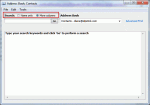
An Outlook user had this complaint: "I used to click on the address book icon and the address book would open to a nice listing of my contacts. Now I get a search box requiring me to enter a search term. How do I get my old address book format back?" Type your search keywords and click "Go" to perform a search At the top of the address book dialog are two … [Read more...] about Tip 810: Outlook's Address Book Search
Tip 716: Change Address Book Sort Order

An Outlook user asked: When I click on "To" to select who I am sending an email to, the "Select Names" dialog box pops up, with "Show Names From The" "Contacts" by default.The list of contact is sorted "First Name Last Name" how do I reverse this ? In "Tools / Options / Contacts / Contacts Options" I already have "Last First" selected in both boxes.The Contacts Options … [Read more...] about Tip 716: Change Address Book Sort Order
Tip 542: Change File As Format
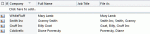
If your contacts use different File As formats and you’d like to have all contacts use a single format but opening each contact to change the FileAs will take more time that you want to spend on it, you can use VBA to change the File As format on all contacts within minutes. A code sample (tested with Outlook 2002, 2003, 2007, and 2010) is available at Bulk Change File … [Read more...] about Tip 542: Change File As Format
Tip 211: Create a 'Sender is NOT in the Address Book rule'
"I am looking for an addition to Outlook XP that instead of adding a rule that says sender in a specified address book, but it says sender is NOT in specified address book. This would work for me to block or handle spam. "You can do it one of two ways:Create a rule to do something with all messages from people in the address book, such as move to the Inbox, and add a … [Read more...] about Tip 211: Create a 'Sender is NOT in the Address Book rule'