• Skip to main content
  • Skip to primary sidebar
  • Skip to footer

Outlook Tips

Learning Microsoft Outlook One Tip At A Time

Diane Poremsky [Outlook MVP]

  • Home
  • Tips Archive
  • How to...
  • Beginner
  • Outlook.com

Disable reminders in Microsoft Outlook

With the holidays approaching and with what seems like everyone taking the last week of the year off, it's a good time to review Outlook's reminder settings.

There are several different methods you can use to disable reminders, depending on what your goal is.

Do you want to stop adding reminders to new appointments and meetings?

If so, you can turn reminders off in Outlook 2010 and newer's File, Options, Calendar dialog. In older versions, this setting is on the Tools, Options, Preferences tab.
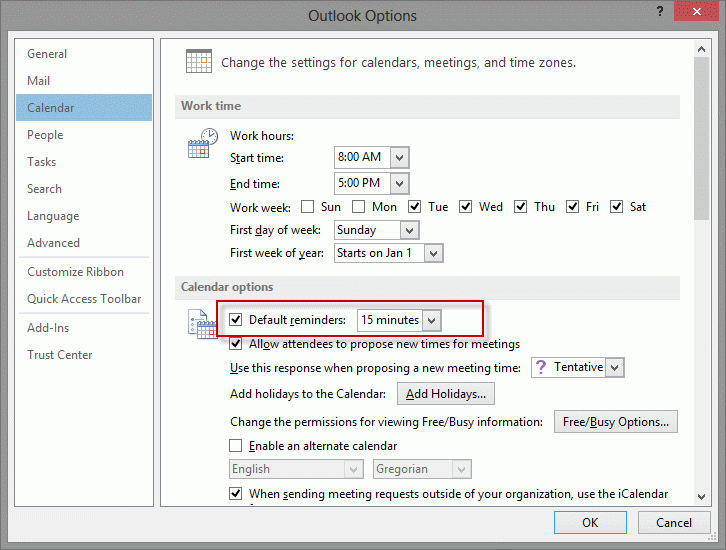
Turn reminder off for new items

Do you want to stop current reminders from firing and erase all past due reminders?

Stop displaying reminders by changing the setting in File, Options, Advanced, Show reminders. In older versions, look in Tools, Options, Other, Advanced, Reminder Options, Display the Reminder.

Use this to quickly disable a bunch of older reminders, such as when returning from vacations. While its off, all reminders that come due are dismissed. Future reminders will work once it’s turned back on.
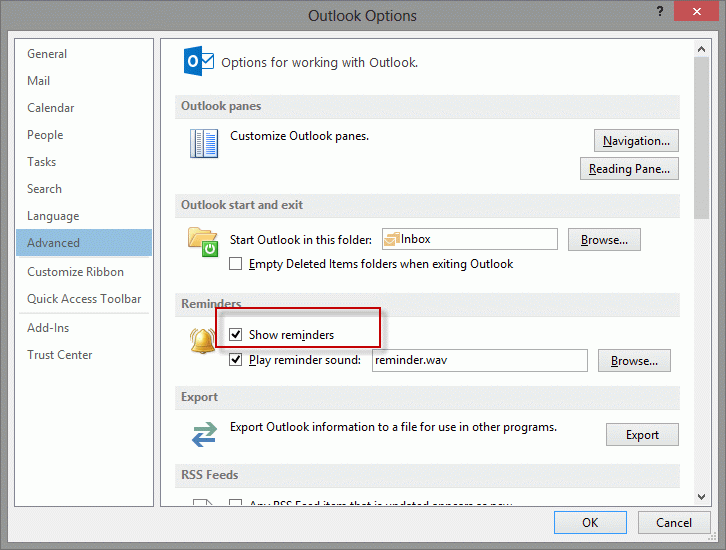
Clear overdue reminders

Do you want to disable reminders for some appointments or all day events, but not others?

Use VBA to set or remove reminders based on predetermined conditions. Get the VBA code at How to Remove Reminders on All Day Events.

Do you want to prevent upcoming recurring tasks from firing reminders?

Mark the task complete. You can do this in the Simple list view in the last folder – click in the Completed column to mark tasks complete.
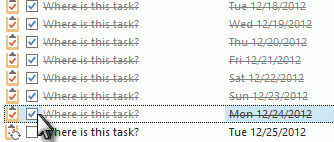
mark tasks complete

Published December 18, 2012. Last updated on January 17, 2018.

Share this:

  • Twitter
  • Facebook
  • LinkedIn
  • More
  • Print
  • Tumblr
  • Reddit
  • Pocket
  • Pinterest

Related posts:

Quick Click flags (and flag for follow up rules) use the reminder settings for Tasks. If you have the option enabled to set remindTip 759: Quick Click Reminders Tip 935: Dismissing Reminders on Recurring Tasks How to quickly dismiss reminders when you return from vacation by turning off reminders.Tip 208: Dismissing Reminders Reminders on flagged items use the same settings as Tasks. You can set reminders automatically when you set a flag by enabling theTip 806: Reminders on Flags
Subscribe
Notify of
1 Comment
Newest
Oldest Most Voted
Inline Feedbacks
View all comments

Primary Sidebar

Search OutlookTips

Training and one-on-one assistance

Do you need help setting up Outlook or want some one-on-one training? I'm available for hire. See Training and one-on-one assistance for fees and to check availability.

All-Time Most Popular Posts

  • Windows 7 and Vista Start Search field
    How to start Outlook in safe mode
  • outlook.com icon
    Delete a message stuck in Outlook's Outbox
  • How to use Outlook's Command line switches
  • Use Cleanviews switch to reset all views
    How to Reset the View on Outlook folders
  • Where are my Outlook Files?
  • Folder paths
    How to Find Folder Paths in Outlook Mailboxes
  • How to use Scanpst.exe to repair Outlook data files
  • Outlook's Missing Holidays
  • backstage page
    Where is File tab in Outlook?
  • Icons found in the Inbox, Message Headers, and Toolbars

Footer

Recent Posts

  • Log into multiple Outlook on the web accounts
  • Keeping Hackers out of Microsoft accounts
  • Microsoft Account Closure Email
  • Outlook on the web Quick Actions moved to the right
  • Automatically sign out of Outlook.com

Recent Bug List

Microsoft keeps a running list of issues affecting recently released updates at Fixes or workarounds for recent issues in Outlook for Windows.

Office Update History

Update history for supported Office versions is at Update history for Office

Resources

Ask questions and share your knowledge in Outlook Forums.

You Might Like

Where is File tab in Outlook?
Using Two-factor authentication
Where are my Outlook Files?
How to use Outlook's Command line switches

© 2003–2025 · Outlook Tips

wpDiscuz
You are going to send email to

Move Comment