• Skip to main content
  • Skip to primary sidebar
  • Skip to footer

Outlook Tips

Learning Microsoft Outlook One Tip At A Time

Diane Poremsky [Outlook MVP]

  • Home
  • Tips Archive
  • How to...
  • Beginner
  • Outlook.com

Outlook 2010 runs in Safe Mode after Update

In Outlook 2010, all of my options were reset to their defaults and when I change them, the changes don't stick. As soon as I close Outlook and restart it, everything is back to its default.

This is caused by installing KB3114409 – it causes Outlook to run in Safe mode, which uses the default settings. Your customizations aren't lost, they just aren't being used when Outlook is in Safe mode.

Microsoft removed the update, so users who haven't installed the December updates yet won't be affected. Users who are affected have two choices to fix this: uninstall KB3114409 or set a registry key to disable Safe mode.

To set the registry key:

  1. Open the Registry editor by pressing Windows key + R
  2. Type regedit in the Open: field. Then click Ok.
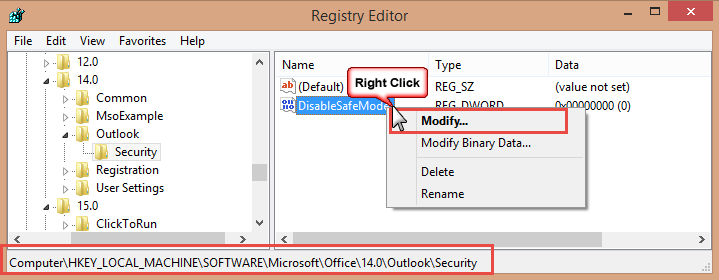
  3. Browse to HKEY_LOCAL_MACHINE\Software\Microsoft\Office\14.0\Outlook\Security\ key on the left side of the Registry Editor
  4. If any key in the path is missing, you'll need to create it. Right click on the last key, choose New > Key and type the missing key name.
  5. Right click on Security key and choose New, and then DWORD Value.
  6. Type DisableSafeMode, and then press Enter.
  7. Right-click on DisableSafeMode, and then click Modify.
    Set the registry key
  8. In the Value data box, type 1, and then click OK.
  9. If you have 64bit Windows and 32bit Office, also add DisableSafeMode, Value: 1 to this key: HKEY_LOCAL_MACHINE\SOFTWARE\Wow6432Node\Microsoft\Office\14.0\Outlook\Security\
  10. Restart Outlook or reboot the computer.
If you don't want to edit the registry, you can use this reg file: DisableSafeMode.reg DisableSafeMode.reg for Outlook 32 bit on Windows 64-bit

Uninstall KB3114409

To uninstall updates, open Control Panel, then find Programs & Features. Click on View Installed Updates on the left. Type KB3114409 in the Search Updates field. Select it and click Uninstall.

More Information

Update adds support for administrators to prevent Outlook 2010 from starting in safe mode

Published December 9, 2015. Last updated on December 10, 2015.

Share this:

  • Twitter
  • Facebook
  • LinkedIn
  • More
  • Print
  • Tumblr
  • Reddit
  • Pocket
  • Pinterest

Related posts:

We're seeing reports of problems with Outlook 2007 following the installation of the    December 14 update forTip 814: Outlook 2007 December 14 update issues Outlook crashes when viewing HTML Messages Windows 7 and Vista Start Search fieldHow to start Outlook in safe mode When Outlook isn’t working correctly we often tell users to use Safe mode. Safe mode loads Outlook without any add-ins or extensioTip 703: Safe mode shortcut
Subscribe
Notify of
18 Comments
Newest
Oldest Most Voted
Inline Feedbacks
View all comments

Primary Sidebar

Search OutlookTips

Training and one-on-one assistance

Do you need help setting up Outlook or want some one-on-one training? I'm available for hire. See Training and one-on-one assistance for fees and to check availability.

All-Time Most Popular Posts

  • Windows 7 and Vista Start Search field
    How to start Outlook in safe mode
  • outlook.com icon
    Delete a message stuck in Outlook's Outbox
  • How to use Outlook's Command line switches
  • Use Cleanviews switch to reset all views
    How to Reset the View on Outlook folders
  • Where are my Outlook Files?
  • Folder paths
    How to Find Folder Paths in Outlook Mailboxes
  • How to use Scanpst.exe to repair Outlook data files
  • Outlook's Missing Holidays
  • backstage page
    Where is File tab in Outlook?
  • Icons found in the Inbox, Message Headers, and Toolbars

Footer

Recent Posts

  • Log into multiple Outlook on the web accounts
  • Keeping Hackers out of Microsoft accounts
  • Microsoft Account Closure Email
  • Outlook on the web Quick Actions moved to the right
  • Automatically sign out of Outlook.com

Recent Bug List

Microsoft keeps a running list of issues affecting recently released updates at Fixes or workarounds for recent issues in Outlook for Windows.

Office Update History

Update history for supported Office versions is at Update history for Office

Resources

Ask questions and share your knowledge in Outlook Forums.

You Might Like

Where is File tab in Outlook?
Using Two-factor authentication
Where are my Outlook Files?
How to use Outlook's Command line switches

© 2003–2026 · Outlook Tips

wpDiscuz
You are going to send email to

Move Comment