• Skip to main content
  • Skip to primary sidebar
  • Skip to footer

Outlook Tips

Learning Microsoft Outlook One Tip At A Time

Diane Poremsky [Outlook MVP]

  • Home
  • Tips Archive
  • How to...
  • Beginner
  • Outlook.com

Tip 1106: Outlook's Restore Window button doesn't work?

Minimize, Restore, Maximize buttonsA surprisingly common problem is Outlook appears to be stuck with the window either Minimized or Maximized. When the Restore button is clicked, Outlook disappears.

When I start Outlook, it starts minimized. It never starts maximized. When I try to Restore the window by clicking on the icon between the minimize button and the close application button, the entire program goes to the minimized format. How do I fix this so that I can adjust the size of the display?

When this happens it means the window was pushed off the screen. This can happen when you accidentally drag the window off-screen or if you lower the screen resolution and had Outlook partially pushed off the screen.

For a quick fix, right-click on the Taskbar and choose Cascade. Any of the windows arrangements should bring Outlook's window on screen, but some users report only Cascade brings it up. I recommend closing all applications except Outlook when you do this, as it will change the size and location of all windows.

If you'd rather "get under the hood" you can delete a value from the registry to reset the windows size and location.

Close Outlook then open the registry editor. Find and delete the values at HKEY_CURRENT_USER\Software\Microsoft\Office\xx.0\Outlook\Office Explorer where xx is your version of Outlook. Delete Frame , and if you have one for Namespaces, delete it as well. When you restart Outlook, it will open at full screen. Resize the window as desired.

HKEY_CURRENT_USER\Software\Microsoft\Office\xx.0\Outlook\Office Explorer
REG_BINARY: Frame
REG_BINARY: Namespaces
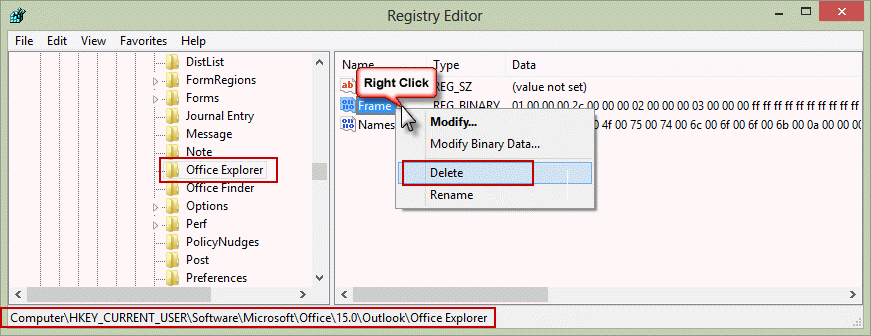
Office Explorer registry key

Do it for me

If you don't want to edit the registry, you can use a .reg file to delete the two values. Download the correct file for your version of Outlook then double click to run. Note: if your web browser saves the file with a .txt extension, you'll need to change the file name to end in reg.

Outlook 2013 Outlook 2010 Outlook 2007 2003

Published September 23, 2013. Last updated on September 23, 2013.

Share this:

  • Twitter
  • Facebook
  • LinkedIn
  • More
  • Print
  • Tumblr
  • Reddit
  • Pocket
  • Pinterest

Related posts:

Tip 1004: The Case of the Missing Reminder Window Solved Tip 60: Restore the Outlook Desktop Icon Clear the 'look in' folder list in choose form dialogTip 957: Delete the MRU list in Choose Form dialog Tip 302: Change the Web Toolbar Search Engine
Subscribe
Notify of
5 Comments
Newest
Oldest Most Voted
Inline Feedbacks
View all comments

Primary Sidebar

Search OutlookTips

Training and one-on-one assistance

Do you need help setting up Outlook or want some one-on-one training? I'm available for hire. See Training and one-on-one assistance for fees and to check availability.

All-Time Most Popular Posts

  • Windows 7 and Vista Start Search field
    How to start Outlook in safe mode
  • outlook.com icon
    Delete a message stuck in Outlook's Outbox
  • How to use Outlook's Command line switches
  • Use Cleanviews switch to reset all views
    How to Reset the View on Outlook folders
  • Where are my Outlook Files?
  • Folder paths
    How to Find Folder Paths in Outlook Mailboxes
  • How to use Scanpst.exe to repair Outlook data files
  • Outlook's Missing Holidays
  • backstage page
    Where is File tab in Outlook?
  • Icons found in the Inbox, Message Headers, and Toolbars

Footer

Recent Posts

  • Log into multiple Outlook on the web accounts
  • Keeping Hackers out of Microsoft accounts
  • Microsoft Account Closure Email
  • Outlook on the web Quick Actions moved to the right
  • Automatically sign out of Outlook.com

Recent Bug List

Microsoft keeps a running list of issues affecting recently released updates at Fixes or workarounds for recent issues in Outlook for Windows.

Office Update History

Update history for supported Office versions is at Update history for Office

Resources

Ask questions and share your knowledge in Outlook Forums.

You Might Like

Where is File tab in Outlook?
Using Two-factor authentication
Where are my Outlook Files?
How to use Outlook's Command line switches

© 2003–2026 ยท Outlook Tips

wpDiscuz
You are going to send email to

Move Comment