![Diane Poremsky [Outlook MVP]](http://www.outlook-tips.net/images/2014/MVP_BlueOnly.png)
After yesterday’s tip on password protecting folders within a pst, an Outlook MVP in Germany reminded me of a utility that can password folders. It’s in German but it’s free… if you want to try LockOutlook, you can get it at //www.add-in-world.com/katalog/ol-lockoutlook/ … [Read more...] about Tip 637: Password Protecting Folders Part 2
Tips Archive
Tip 636: Password Protect Folders
A subscriber wanted to know if there was a way to password protect the file folders in folder list. No. You can password the pst file but not folders within a pst. If you do use a password on the pst, you need to enter when you open Outlook and the contents of the pst will be accessible to anyone as long as Outlook is open. If security is a concern, get in the habit of … [Read more...] about Tip 636: Password Protect Folders
Tip 634: Let’s Really Fix Outlook

The Email Standards Project, backed by CampaignMonitor and other email-marketers, is trying to use Twitter to convince Microsoft to change how Outlook renders HTML.Outlook's broken - Let's fix itFrom an email marketer to a user who said the solution was to not use HTML email:It's not about you. It's mostly about the designers and developers having to cobble together … [Read more...] about Tip 634: Let’s Really Fix Outlook
Tip 633: Tasks, Reminders & Due dates
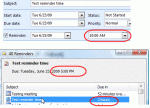
Recent updates to Outlook 2007 changed the behavior of tasks in the reminder window. In the past, reminders that fired at 10 AM showed due at 10 AM in the reminder window and an hour overdue at 11 AM. Now, the reminder window shows the tasks due at the end of the workday (set in Tools, Options, Calendar options) so the same task that was overdue at 11 AM is now due in 2 … [Read more...] about Tip 633: Tasks, Reminders & Due dates
Tip 632: Default Tasks Due Date
An Outlook user had this question: “Can I set the default due date for tasks in Outlook 2007 to "None". Most of the tasks I create (using the To-Do Bar’s Type a Task field) do not require a due date. The default seems to be "Today".” None is the default for Tasks created using the New button (and can’t be changed). My default using your method is Tomorrow, so yes, you can … [Read more...] about Tip 632: Default Tasks Due Date