![Diane Poremsky [Outlook MVP]](http://www.outlook-tips.net/images/2014/MVP_BlueOnly.png)
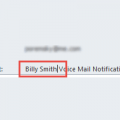
An Outlook user wanted to know how to identify emailed voice messages and faxes with the person who left the message or sent the fax. The voice mail and fax servers send them from a generic address and he wants to make it easier to see who they are really from. While he could link Contacts to the messages, it’s not very visible.My suggestion is to type the sender name in … [Read more...] about Tip 565: Edit the Subject
Tips Archive
Tip 564: Default Meeting Length
If you create a new appointment by clicking the new button when in the month view, it defaults to 30 min, if you use the day or week view, it uses the same time period as on the time scale. … [Read more...] about Tip 564: Default Meeting Length
Tip 563: Custom forms and Outlook Security
For a custom message form with custom properties to work fully, the form must be published to the Organizational Forms library or to each user's Personal Forms library, with the "Send form definition with item" box on the (Properties) page of the form design unchecked. Simpler forms without custom properties will work correctly. For more information, see Changes to … [Read more...] about Tip 563: Custom forms and Outlook Security
Tip 562: To-Do Bar Time and Dates
A reader wants to know how to show the date on appointments in the To-Do Bar:“When I look at my appointments in the To Do Bar I can't tell which day of the week the appointment is for since it only shows the appointment time. It does show up when I move the mouse over the appointment but I would prefer just to look at it and see the date. Is there some setting I need to … [Read more...] about Tip 562: To-Do Bar Time and Dates
Tip 561: Linking Outlook Items
There are two different ways you can link an Outlook item to a Contact. 1. You can insert an Outlook item into a contact. Open the Contact and click the Insert menu, Attach item command. Browse to the item you want to link and click insert. 2. You can associate a Contact with Outlook items so they show up on the Activities tab. At the bottom of opened Calendar, Contacts, and … [Read more...] about Tip 561: Linking Outlook Items