![Diane Poremsky [Outlook MVP]](http://www.outlook-tips.net/images/2014/MVP_BlueOnly.png)
I get quite a few questions from users who have a personal and business email account configured in their profile. They want to store Sent items in different folders based on the account that was used to send the message. While this is an easy problem to fix, the administrator in me has to mention that its better to use separate Outlook profiles or even a different email … [Read more...] about Tip 549: Save Sent Items
Tips Archive
Tip 544: Remove RSS Folder
A common question isCan I remove the RSS folder in Outlook 2007?Yes, you can use a group policy to remove RSS capability from Outlook 2007, Outlook 2010, and up. If you disable RSS after you create your profile, you’ll need to make a new PST to get rid of the folder or use MFCMAPI to delete it. While group policy is considered by many to be a ‘corporate’ feature, anyone … [Read more...] about Tip 544: Remove RSS Folder
Tip 543: Save meetings, don’t send updates

Note: This tip was originally written for Outlook 2007 when an add-in blocked the ability to Save and not send updates. The same basic solution will work in newer versions too: use the Save button or Ctrl+S when the 'Save but don't send updates' option is missing after editing the message body. If you edit the date & time or location you will need to send updates. Microsoft no … [Read more...] about Tip 543: Save meetings, don’t send updates
Tip 542: Change File As Format
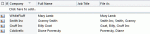
If your contacts use different File As formats and you’d like to have all contacts use a single format but opening each contact to change the FileAs will take more time that you want to spend on it, you can use VBA to change the File As format on all contacts within minutes. A code sample (tested with Outlook 2002, 2003, 2007, and 2010) is available at Bulk Change File … [Read more...] about Tip 542: Change File As Format
Tip 541: Activities Tab
Activities is available in Outlook 2010 and older.The Activities tab on Contacts is a source of confusion for many users – they worry that forwarding the contact includes Activity information from their own computer.It does not.Activities uses an Advanced Find to show all the Outlook items in your mailbox associated with the contact. If you forward the contact to … [Read more...] about Tip 541: Activities Tab