![Diane Poremsky [Outlook MVP]](http://www.outlook-tips.net/images/2014/MVP_BlueOnly.png)
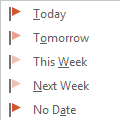
One behavior that annoyed a lot of longtime Outlook users is how Outlook handled Flag for Follow up reminders. If you used the Today flag and had reminders enabled for all tasks with a due date, Outlook set the reminder to 1 hour before the end of your business day.This behavior changed in Outlook 2007. When you use Outlook 2007, Outlook 2010, or Outlook 2013, a message … [Read more...] about Flag for Today Reminder Times
Tips Archive
Outlook Status bar: Filter applied, no total or unread counts

I’m often asked about the “Filter Applied” notation in the status bar of Outlook 2010 and Outlook 2013. The person often insists they did not apply a filter to the view and don't understand why it's there.When I right-click on the status bar, Filter is unchecked, but shows "filter applied". Both "items in view" and "unread items in view" are checked but do not show … [Read more...] about Outlook Status bar: Filter applied, no total or unread counts
Make Outlook Appointments Private by Default

All appointments and meetings I create in Outlook are Private, by default. How can I turn this off? If I want something to be private, I will set it to Private myself.What your default sensitivity set to?In Outlook 2010 or Outlook 2013, check your Sensitivity settings in File, Options, Email. In older versions of Outlook, it's in Tools, Options, Email Options, … [Read more...] about Make Outlook Appointments Private by Default
Uninstall the Windows Mail app

One of the members of the Outlook-Users mailing list wanted to remove his Microsoft account from the Windows 8 Mail app because he was receiving the “too many devices” error message. Can the mail app in 8.1 simply be uninstalled on my 8.1 machines such that I don’t have them to worry about, since I don’t use them? I’m getting the “too many interfaces” error message and this … [Read more...] about Uninstall the Windows Mail app
Does Resend include the BCC addresses?
If I send an email with blind copies and want to resend to all recipients will reply to all go to the 'blind addresses'?Yes, when you use the resend command the message will be resent to everyone you originally addressed the message to, including BCC recipients, even though the BCC field may not be visible, unless you remove their address before sending.When you click … [Read more...] about Does Resend include the BCC addresses?