![Diane Poremsky [Outlook MVP]](http://www.outlook-tips.net/images/2014/MVP_BlueOnly.png)
A few tips ago, I told you how to handle the birthdays for the spouse and children of your contacts by creating appointments for each and linking them to the contact. But how do you handle phone numbers for each family member? Outlook labels the phone fields with some really stupid and useless field names they'll never use (at least in the opinion of the majority of Outlook … [Read more...] about Tip 311: Storing Additional Phone Numbers
Tips Archive
Tip 310: Outlook's Calendar and Long Months
Just a reminder, because October is a long month and started on a weekend, the monthly calendar may not behave as expected on Sunday and Monday, especially if you use compressed weekends. For more information, see//www.slipstick.com/calendar/wrongweek.htm To enable or disable compressed weekends: right click on the 30 day calendar and choose Other settings. Add or … [Read more...] about Tip 310: Outlook's Calendar and Long Months
Tip 309: Printing Email

When you print a message in Outlook, your name appears at the top of the printout. To change it you need to change the display name in your default account. If this doesn't work after a reboot, you'll need to create a new profile and use the display name you prefer in the display name field. (Most Exchange mailbox users can't change the name on their accounts, an admin would … [Read more...] about Tip 309: Printing Email
Tip 308: Check Every Minute?
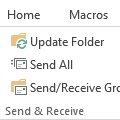
How frequently should Outlook check for new mail on the server?For optimal service in both Outlook and on the mail server, no less than 8 - 10 min, longer if you use a dial-up account. Be kind to your email provider - every min or two is too frequent!Thanks to changes in versions of Outlook released since the initial publication of this tip in 2005 and faster Internet … [Read more...] about Tip 308: Check Every Minute?
Tip 307: Shortcuts for Reading the Next Message
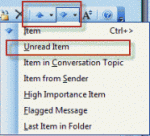
Does Outlook have a "next unread message" feature? Sure, but it's not quite as easy to use as it is in some other email programs. With a message open, you can use the blue up and down arrow buttons or keyboard shortcuts of Ctrl+> and Ctrl+< to go to the next message, read or unread. The button dropdown menus have a number of options, including one for the next unread … [Read more...] about Tip 307: Shortcuts for Reading the Next Message