![Diane Poremsky [Outlook MVP]](http://www.outlook-tips.net/images/2014/MVP_BlueOnly.png)
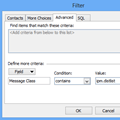
An Outlook user asked the following question. Although he is asking specifically about Outlook 2010, the method is the same in all versions of Outlook even though the menus are different.How can I view my Contact Groups together in Outlook 2010, separately from the individual contacts?To view only Contact Groups (aka Distribution Lists, in older versions) in your … [Read more...] about Tip 1127: How to view only Contact Groups in Outlook
Tips Archive
Tip 1126: Copy and paste Appointments into new time slots
This question came from an Outlook user who recently upgraded to Outlook 2013:In Outlook 2013, I create an appointment on a specific day with a specific start and end time, set a reminder, etc. and Save it. When I go to the month view, I can click on the appointment to select it, then type Ctrl+C to copy it. I select another date and paste it using Ctrl+V. Except it … [Read more...] about Tip 1126: Copy and paste Appointments into new time slots
Tip 1125: Add new holidays to Outlook Calendar and remove old holidays
This question about Outlook's Holidays came up this week.I have Outlook 2010, and my holidays ended 12/31/13. If I add holidays they will go backwards as well as forward, I don't want the old holidays and I need to keep my past appointments, so I can't archive the calendar to remove the old holidays. And I'm sure the past holidays will be duplicated when I add the new … [Read more...] about Tip 1125: Add new holidays to Outlook Calendar and remove old holidays
Tip 1124: Did Ctrl+Q stop working in Outlook?
Users are complaining that Ctrl+Q (Mark as Read shortcut in Outlook) has stopped working.My Ctrl+Q (Mark as Read shortcut) stopped working. My mail management routine is based on marking as read items that are either closed or are not needed any further attention. Pressing Ctrl+Q won't do anything. Ctrl+U for making unread works perfectly.It's not you, it's Bing. … [Read more...] about Tip 1124: Did Ctrl+Q stop working in Outlook?
Tip 1122: Sort order in Outlook's People Hub
Bob asked this question: When I select PEOPLE, I see a list of the contacts I imported. Most display as First Name then Last name, but some display Last Name and then First Name. I have edited each of them and the data is entered properly for each. First names in first name field and last name in last name field. Why are some displaying one way and others displaying another … [Read more...] about Tip 1122: Sort order in Outlook's People Hub