![Diane Poremsky [Outlook MVP]](http://www.outlook-tips.net/images/2014/MVP_BlueOnly.png)

Richard asks:Please can you advise how many contacts ( i.e. the total limit number ) that Outlook can hold?Early versions of the Exchange client supported about 16,000 items per folder. Outlook, with large table support enabled, supports about 65,000 items per folder. (Large table support is the default for new pst's created since Outlook98.) Outlook 2003 with a … [Read more...] about Tip 76: How many items can Outlook hold?
Tips Archive
Tip 75: Sorting the Address Book Entries
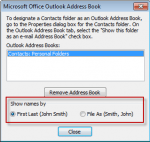
You can change how your address book entries are sorted by changing the sort order in the Address book options dialog.Your choices are "First Last" or "File as" format.To change this in Outlook 2003 and older, go to Tools, E-mail accounts, View or change existing directories or address books, Outlook Address Book, Change, Set your sort order. … [Read more...] about Tip 75: Sorting the Address Book Entries
Tip 74: Using Simple Find
Outlook has two Finds: the simple Find which displays a Find pane above your message or item lists and Advanced Find which opens the Advanced Find window. Many times, you can find what you need using the simple Find and it searches multiple folders and items types. Tips to improve your searches: Use commas to separate multiple keywords. (This OR's the keywords … [Read more...] about Tip 74: Using Simple Find
Tip 72: Customer Feedback Tool
In every Office 2003 application there is an item on the Help menu for "Customer Feedback Options". When you turn this on, you tell the Office team how you use their product. This feedback is then used to help prioritize development in future versions. While it's not the only criteria used, it gives the developers statistical data to refer to when making decisions on what … [Read more...] about Tip 72: Customer Feedback Tool
Tip 70: Unread message count
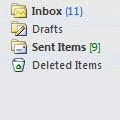
Merged Tip 805: Numbers following folder namesOutlook 2003 (and up) gives you the option to show total number of messages in the folder in green brackets "[9]" and unread message count shown in blue parenthesis "(11)".In Outlook 2013 the design changed a bit. Both unread and total message counts are blue, with total message counts in blue brackets [1609] and unread … [Read more...] about Tip 70: Unread message count