![Diane Poremsky [Outlook MVP]](http://www.outlook-tips.net/images/2014/MVP_BlueOnly.png)
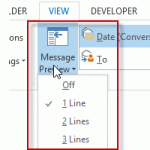
Outlook 2013 makes a change to the 3 line preview feature in older versions: you can choose 1, 2, or 3 line preview and select it from a button on the ribbon for quick changes.I see the new feature where you can set it to preview 1-3 lines of email. But I'd like to have the ability to do what I have always done in Outlook and preview just the Unread Emails. How can I … [Read more...] about Tip 1071: Auto Preview Email in Outlook 2013
Tips Archive
Tip 1070: Proper case ribbon names in Office 2013
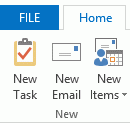
This tip comes from Rick Bretschneider, Powerpoint MVP and one of the very few things I can share from the MVP Summit last week. Do you hate the upper case ribbon names in Outlook 2013? The fix is incredibly simple: add a leading space to the name and the name converts to proper case. (While I normally love incredibly-easy-to-fix annoyances, this one is screaming "if its … [Read more...] about Tip 1070: Proper case ribbon names in Office 2013
Tip 1069: QAT and Calendar shortcuts
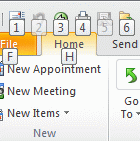
In Outlook 2010 and Outlook 2013 the Alt+n shortcuts do double duty. In any module, Alt+ a number works as a shortcut for the Quick Access Toolbar (QAT) buttons. In the Calendar Alt+ a number is used to display 1 to 10 consecutive dates on the calendar.Although it seems like you can't use the QAT shortcuts in the calendar, it's all in the timing.If you want to display … [Read more...] about Tip 1069: QAT and Calendar shortcuts
Tip 1068: Change the size of the font in Outlook's Folder list
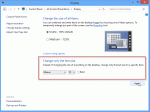
This tip is specific to Windows 8. The only way to change the font sizes in Windows 10 is by increasing the display %.This tip comes from Cowboy:As we all know, Microsoft removed the ability to change the font and font size in the Outlook 2013 folder list. But all is not lost. For those people with high resolution monitors and/or poor vision there is something we can … [Read more...] about Tip 1068: Change the size of the font in Outlook's Folder list
Tip 1067: Search People finds contacts that don't exist
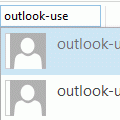
I have a feeling the changes introduced in the Search People feature (in the Home ribbon, formerly Find a Contact) is going to result in a lot of questions down the road, as more people upgrade to Outlook 2013.I upgraded to Office 365 Home Premium. If I search for a Contact in Outlook, using the search box at the top of my Contacts list, all I receive is the message: "We … [Read more...] about Tip 1067: Search People finds contacts that don't exist